
How can we help you?
Yes. Cart2Cart can migrate multiple AmeriCommerce / Cart.com Online Store storefronts in one Wizard run when the Access Token can see every store.
1. Create or open an API app and Access Token as described in How to retrieve Access Token from Spark Pay (AmeriCommerce) (path: Tools → Apps & Addons → API Apps & Integrations).
2. On that app/token settings screen, enable Tokens Access All Stores (check the box) and save. Without this, the token may only authorize the primary store.
3. In the Cart2Cart Migration Wizard, enter the store URL and Access Token for AmeriCommerce / Cart.com Online Store.
4. On the Multi-store Configuration step, confirm every storefront you intend to migrate is listed. If a store is missing, re-check the token permissions and regenerate/view the token if needed.
5. Map entities and continue with Demo or Full Migration for the selected stores.
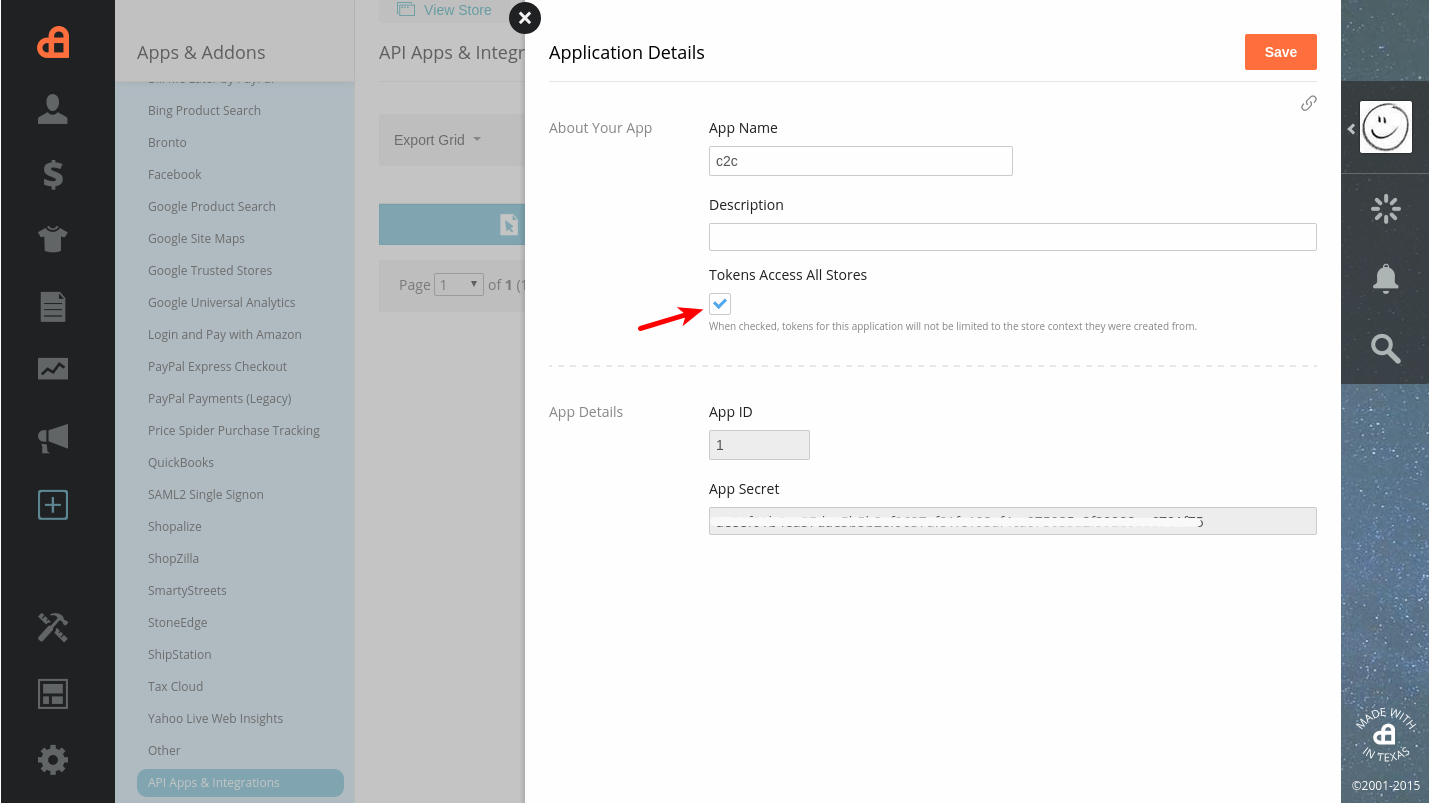
Account branding may show Cart.com, AmeriCommerce, or Spark Pay; the API Apps & Integrations location is the same. Enterprise multi-store provisioning (Central API Router) is separate—for Cart2Cart, prefer a single-token flow with Tokens Access All Stores enabled.
Do you need help? Contact our support team
Just set up the migration and choose the entities to move – the service will do the rest.
Try It FreeDelegate the job to the highly-skilled migration experts and get the job done.
Choose Package