

ThriveCart to Magento Migration - Step-by-Step Guide & Expert Services
ThriveCart to Magento migration just got easier. Ready to elevate your e-commerce? Seamlessly move ThriveCart store to Magento with Cart2Cart. Ensure a secure, fast data transfer, preserving all your SEO rankings and achieving zero downtime. We make it easy to switch from ThriveCart to Magento. Explore our detailed step-by-step guide for a confident DIY migration or opt for our expert-assisted service to transfer data effortlessly. Experience a smooth, reliable ThriveCart to Magento migration today.
What data can be
migrated from ThriveCart to Magento (Adobe Commerce)
-
Products
-
Product Categories
-
Manufacturers
-
Customers
-
Orders
- Name, SKU, Short Description, Full Description, Manufacturer, Tax Class.
- MSRP.
- Meta Title, Meta Keywords, Meta Description.
- Quantity, Stock Availability.
- Weight, Width, Height.
- Related Products.
- Options(Name, Price).
- Name, Status.
- Meta Title, Meta Description, Meta Keywords.
- Name.
- ID, Newsletter, Gender, Date of Birth, Created Date.
- Customer Billing Address.
- Customer Shipping Address.
- ID, Order Date, Order Status, Order Products(Name, SKU), SubTotal Price, Discount Price, Tax Price, Shipping Price, Total Price.
- Customer Name, Email, Billing Address.
- Shipping Address.
- Name, SKU, Short Description, Full Description, Manufacturer, Tax Class.
- MSRP.
- Meta Title, Meta Keywords, Meta Description.
- Quantity, Stock Availability.
- Weight, Width, Height.
- Related Products.
- Options(Name, Price).
- Name, Status.
- Meta Title, Meta Description, Meta Keywords.
- Name.
- ID, Newsletter, Gender, Date of Birth, Created Date.
- Customer Billing Address.
- Customer Shipping Address.
- ID, Order Date, Order Status, Order Products(Name, SKU), SubTotal Price, Discount Price, Tax Price, Shipping Price, Total Price.
- Customer Name, Email, Billing Address.
- Shipping Address.
Products
Estimate your Migration Cost
Due to Cart2Cart`s flexible pricing policy, the migration price depends on the number of transferred entities and the additional migration options you select. Just choose your Source and Target platforms and get the approximate price of your ThriveCart to Magento store conversion right after completing the free Demo.
How to Migrate from ThriveCart to Magento In 3 Steps?
Connect your Source & Target carts
Choose ThriveCart and Magento from the drop-down lists & provide the stores’ URLs in the corresponding fields.
Select the data to migrate & extra options
Choose the data you want to migrate to Magento and extra options to customise your ThriveCart to Magento migration.
Launch your Demo/Full migration
Run a free Demo to see how the Cart2Cart service works, and when happy - launch Full migration.
Migrate ThriveCart to Magento: The Ultimate 2025 Guide for a Seamless Transition
Seamlessly Migrate Your E-commerce Store from ThriveCart to Magento
Are you considering moving your online store from ThriveCart to the robust and scalable Magento platform? This comprehensive guide will walk you through every critical step, ensuring a smooth and successful data transfer. While ThriveCart excels as a checkout and cart solution, migrating to Magento offers expanded features for complex catalogs, advanced inventory management, multi-store capabilities, and enhanced customization, positioning your business for significant growth.
Since ThriveCart is primarily a checkout and sales platform and does not offer direct database access or a specific migration bridge for comprehensive store data, the transition to Magento will primarily involve exporting your essential data into CSV files and then importing them into our migration tool. This method, often referred to as CSV.File Data Migration, ensures that all your vital information, such as products, customer profiles, and order history, makes its way to your new Magento store.
By following this expert-designed process, you can confidently replatform your business, minimizing downtime and preserving critical SEO rankings and customer relationships.
Prerequisites for a Successful Migration to Magento
Before you embark on your migration journey, proper preparation is key. Ensuring these prerequisites are met will streamline the process and prevent potential hurdles:
- ThriveCart Data Export: You will need to export all relevant data from your ThriveCart account into CSV (Comma Separated Values) files. This typically includes product details (SKUs, descriptions, pricing, images), customer information (names, email addresses, shipping/billing details), and order history.
- A Functional Magento Store: Have your Magento instance fully set up and accessible. This includes installing Magento on your chosen hosting, configuring server requirements, and ensuring you have administrative access. Read our guide on how to prepare your target store for migration.
- Admin Credentials for Magento: You'll need full administrative access (admin login, password, and URL) to your Magento backend to facilitate the connection bridge installation.
- FTP/SFTP Access to Magento: You'll require FTP or SFTP access to your Magento root directory to upload the connection bridge file. Understanding what a root folder is will be helpful here.
- Consider a Magento Password Migration Module: Magento requires a specific module for migrating customer passwords securely. Plan to install this or discuss alternatives with your migration specialist.
- Reviews Table Check: If migrating product reviews, confirm your Magento installation is ready to receive this data, as reviews table dependency is noted.
- Backup Your Data: Always perform a complete backup of your ThriveCart exported data and your new Magento installation before starting the migration. This is a crucial step for data integrity and recovery.
Performing the Migration: A Step-by-Step Guide
With your preparations complete, let's begin the step-by-step process of transitioning your store data using our specialized migration wizard.
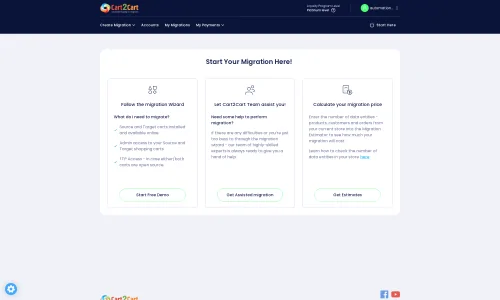
Step 1: Start Your Migration Journey
Begin by accessing the migration tool. Here, you'll choose to start a new migration, which typically involves selecting your source and target platforms.
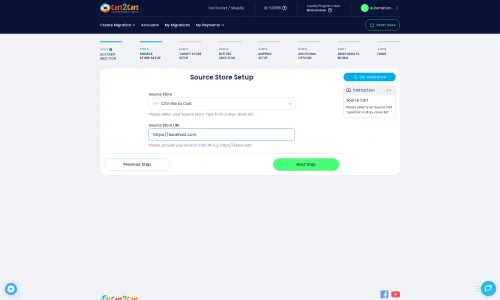
Step 2: Connect Your Source Store (ThriveCart via CSV)
Since ThriveCart does not support a direct API connection for bulk data export in the traditional e-commerce sense, you will select 'CSV File to Cart' as your source platform. Upload the CSV files containing your exported product data, customer details, and order history from ThriveCart. Ensure your CSV files are well-formatted and contain all necessary fields.
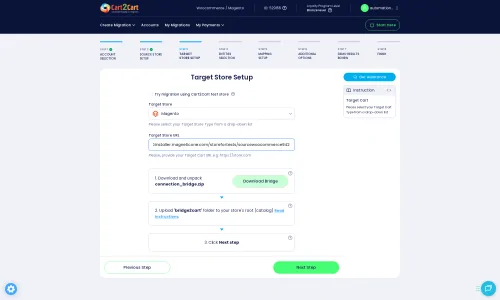
Step 3: Set Up Your Target Magento Store
Next, select 'Magento' as your target shopping cart. You will need to provide your Magento store's URL and then download the Connection Bridge. Unzip this file and upload the 'bridge2cart' folder to the root directory of your Magento installation via FTP/SFTP. This bridge is essential for our tool to establish a secure connection and perform the data transfer.
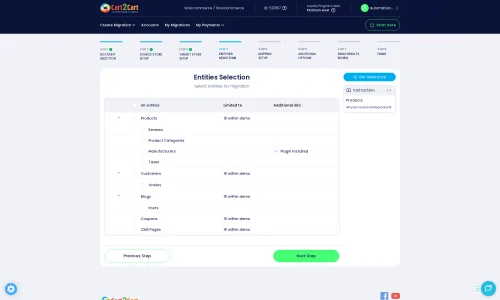
Step 4: Select Entities for Migration
At this stage, you'll choose which data entities you wish to migrate from your ThriveCart CSVs to Magento. Supported entities typically include:
- Products (including SKUs, variants, attributes)
- Product Categories
- Product Manufacturers
- Product Reviews
- Customers
- Orders (with order statuses and invoices)
- Taxes
- Coupons
- CMS Pages
You can select all entities or pick specific ones based on your replatforming strategy. For a comprehensive migration, selecting all relevant entities is recommended.
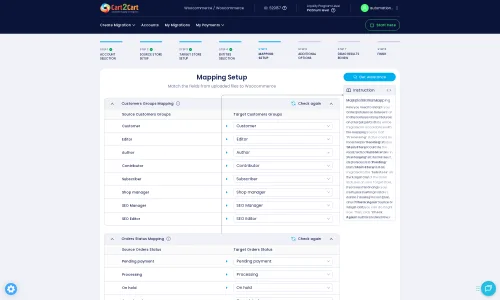
Step 5: Configure Data Mapping
Data mapping is crucial for ensuring that information from your ThriveCart CSVs aligns correctly with the data structure of Magento. Here, you will map fields such as customer groups and order statuses from your source to their corresponding equivalents in Magento. This step ensures data consistency and integrity, preventing data loss or misinterpretation.
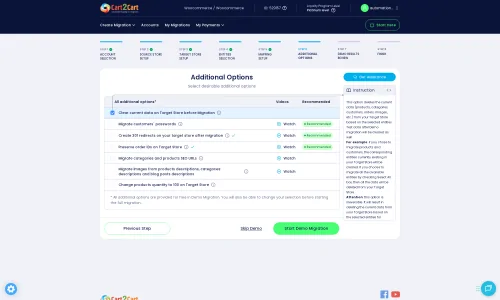
Step 6: Choose Additional Migration Options
Enhance your migration with various additional options tailored to your needs. These can include:
- Clear Target Store Data: Opt to clear current data on the target store before migration, which is useful for fresh Magento installations.
- Preserve IDs: Maintain original product, customer, and order IDs. Learn how Preserve IDs options can be used.
- Migrate Images in Description: Ensure product images embedded in descriptions are transferred.
- Create 301 SEO URLs: Crucial for maintaining your search engine rankings by redirecting old ThriveCart URLs to new Magento URLs.
- Password Migration: This requires a specific Magento module. Ensure it's installed if you want to migrate customer passwords.
- Migrate Store Config: Transfer core store configurations.
Step 7: Perform Demo Migration (Highly Recommended)
Before committing to a full migration, run a free demo migration. This allows you to transfer a limited number of entities (e.g., 10-15 products, customers, orders) to your Magento store. It's an excellent opportunity to review the accuracy of the data transfer, test functionalities, and ensure everything works as expected without cost or risk. It also helps you estimate the full migration time and cost.
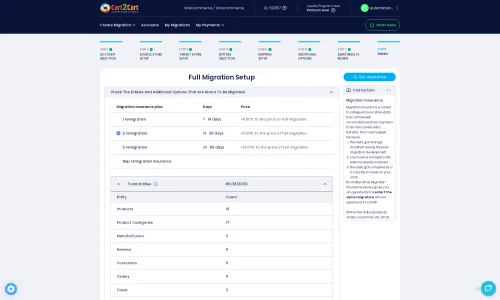
Step 8: Initiate Full Migration
Once you're satisfied with the demo results, proceed with the full migration. Review your selections, choose an appropriate Migration Insurance Service for peace of mind and potential remigrations, and launch the process. The duration of the migration will depend on the volume of your data.
Post-Migration Steps for Your Magento Store
Congratulations, your data has been moved! However, the work isn't quite finished. These post-migration steps are crucial for optimizing your new Magento store:
- Reindex Magento: After any significant data import, Magento requires reindexing to update its internal search and catalog structures. This is a critical step for proper store functionality.
- Install and Configure Extensions: Install any necessary Magento extensions (e.g., payment gateways, shipping methods, marketing tools) that replicate or enhance the functionalities you had with ThriveCart or desire for your new platform.
- Test Everything: Thoroughly test all aspects of your new Magento store:
- Product pages: Check images, descriptions, pricing, and variants.
- Checkout process: Place test orders from various customer accounts.
- Customer accounts: Verify login, order history, and address books.
- Search functionality: Ensure product search yields accurate results.
- Mobile responsiveness: Confirm your store looks and functions well on all devices.
- Update DNS and Redirects: Once you're confident in your new Magento store, update your domain's DNS records to point to your new Magento hosting. Ensure all 301 redirects are properly configured to preserve link equity and guide visitors from old ThriveCart URLs to their new Magento counterparts.
- SEO Review: Monitor your search engine rankings and traffic to ensure the migration hasn't negatively impacted your SEO. Make adjustments as needed, focusing on metadata, page titles, and content.
- Ongoing Optimization: Magento offers vast opportunities for optimization. Continue to refine your store's performance, user experience, and marketing strategies to leverage the full power of your new platform.
Migrating from ThriveCart to Magento is a significant undertaking that, when executed correctly, can unlock immense potential for your e-commerce business. By following this detailed guide and leveraging specialized migration tools, you can ensure a smooth, secure, and successful transition. If you encounter any challenges or prefer expert assistance, don't hesitate to contact our support team for guidance or managed migration services.
Ways to perform migration from ThriveCart to Magento
Automated migration
Just set up the migration and choose the entities to move – the service will do the rest.
Try It Free
Data Migration Service Package
Delegate the job to the highly-skilled migration experts and get the job done.
Choose Package
Custom Migration
Need metafields, SEO URLs, variant rules, or other tailored mapping? Explore customizations built for real merchant demand.
Browse Customizations

Benefits for Store Owners

Benefits for Ecommerce Agencies
Choose all the extra migration options and get 40% off their total Price

The design and store functionality transfer is impossible due to ThriveCart to Magento limitations. However, you can recreate it with the help of a 3rd-party developer.

Your data is safely locked with Cart2Cart
We built in many security measures so you can safely migrate from ThriveCart to Magento. Check out our Security Policy
Server Security
All migrations are performed on a secure dedicated Hetzner server with restricted physical access.Application Security
HTTPS protocol and 128-bit SSL encryption are used to protect the data being exchanged.Network Security
The most up-to-date network architecture schema, firewall and access restrictions protect our system from electronic attacks.Data Access Control
Employee access to customer migration data is restricted, logged and audited.Frequently Asked Questions
Should I use an automated tool or hire an expert for ThriveCart to Magento migration?
What data entities are migrated from ThriveCart to Magento?
Will my ThriveCart store's design and theme transfer directly to Magento?
Can customer passwords be migrated from ThriveCart to Magento?
How long does a ThriveCart to Magento migration usually take?
How can I prevent SEO loss when migrating from ThriveCart to Magento?
What factors influence the cost of a ThriveCart to Magento migration?
How can I verify data accuracy after migrating from ThriveCart to Magento?
Will my ThriveCart store experience downtime during migration to Magento?
Is my data secure during the ThriveCart to Magento migration process?
Why 150.000+ customers all over the globe have chosen Cart2Cart?
100% non-techie friendly
Cart2Cart is recommended by Shopify, WooCommerce, Wix, OpenCart, PrestaShop and other top ecommerce platforms.
Keep selling while migrating
The process of data transfer has no effect on the migrated store. At all.
24/7 live support
Get every bit of help right when you need it. Our live chat experts will eagerly guide you through the entire migration process.
Lightning fast migration
Just a few hours - and all your store data is moved to its new home.
Open to the customers’ needs
We’re ready to help import data from database dump, csv. file, a rare shopping cart etc.
Recommended by industry leaders
Cart2Cart is recommended by Shopify, WooCommerce, Wix, OpenCart, PrestaShop and other top ecommerce platforms.
Trusted by eCommerce dominators since 2009















Very good support. They migrated our store from Big Cartel to Magento, and were very cooperative during all this process. Thank you team. I recommend them to everyone
Review source

I have successfully used Cart2Cart to migrate products & categories from DrupalCommerce to Magento. It’s easy, affordable and they offer decent support (no I’m not affiliated with them).
Review source

we have already contracted the service three times to migrate from prestashop to magento. We were very well catered for. I recommend!
Review source

Many of my customers have Magento 1 stores. This year Magento will stop supporting this system and because of this these customers need to migrate to another system. Migration can be difficult and very time consuming process. But then i found Cart2Cart. There solution is the best and affordable. With the first migration there where some problems, but i did made some mistakes with filling in the correct fields to get a connection between the current and the target store. After starting a chat these problems where fixed very quickly. Support is very good and there solution is very affordable. The perfect solution!
Review source

We were in need of migrating 10.000 orders & customers from a PrestaShop site to a Magento site, already being in use. We therefore needed to be extra careful not to erase any of the existing data, which is why we seeked out the service of Cart2Cart. With a readily available customer service providing guidance and support during the entire process, we felt secure in the choice of Cart2Cart. We also enjoyed the possibility to do a test migration to be able to verify the values, before going ahead with a full migration. The full migration was surprisingly quick, within just a couple of minutes we had successfully transfered all the data, without experiencing any issues on the site. I’d recommend Cart2Cart to anyone who are looking to simplify the process of migrating.
Review source

Great product, great service. I have done successfully migration from WooCommerce to Magento 2. Using Cart2Cart migration tools I've Migrated 2163 Customers and 2297 Orders in just a few minutes.Very good support team. I highly recommend them to anyone needing to migrate their website. Thank you Cart2Cart!
Review source
I used this service for migrating my Magento 1 shop to Magento 2 and this was working great. The customer service is very nice and are helping great when any questions. Thanks you guys!
Review source
Everything went perfect with my Magento 1 to Magento 2 migration. Any issues I had with migration were immediately resolved and there was always someone from the support team available to answer my questions. Will definitely be using this company again to handle any migrations I have in the future.
Review source
Really good services, I transfer my magento 1.9 data to magento 2 and everything goes well with the migration. I will recommend cart2cart to those who want to migrate their data. Once again thank you for your services.
Review source
We used Cart2cart several times for migration from Magento 1 to Magento 2. This always works great. If there are any problems there will also be a very good helpdesk that will help you with problems if there are.
Review source