

Shoper to Shopify Migration - Step-by-Step Guide & Expert Services
Shoper to Shopify migration is simplified with Cart2Cart. Ready to move Shoper store to Shopify? Our automated service ensures a secure, swift transfer of all your crucial data, preserving SEO and guaranteeing zero downtime. Whether you need a comprehensive guide to switch from Shoper to Shopify yourself, or prefer our experts to handle the entire process, we provide a seamless solution. Efficiently transfer data with peace of mind. Experience a smooth Shoper to Shopify migration today.
What data can be
migrated from Shoper to Shopify
-
Products
-
Product Categories
-
Manufacturers
-
Customers
-
Orders
- Name, SKU, Full Description, Manufacturer.
- Meta Title, Meta Description.
- Quantity.
- Weight.
- Options(Name).
- Name, Status.
- Meta Title, Meta Description.
- Name.
- Newsletter.
- Customer Billing Address.
- Customer Shipping Address.
- Order Date, Order Status , Order Products(Final Price, Tax Value, Name, SKU), Discount Price, Tax Price, Shipping Price.
- Customer Name, Email, Billing Address.
- Shipping Address.
- Name, SKU, Full Description, Manufacturer.
- Meta Title, Meta Description.
- Quantity.
- Weight.
- Options(Name).
- Name, Status.
- Meta Title, Meta Description.
- Name.
- Newsletter.
- Customer Billing Address.
- Customer Shipping Address.
- Order Date, Order Status , Order Products(Final Price, Tax Value, Name, SKU), Discount Price, Tax Price, Shipping Price.
- Customer Name, Email, Billing Address.
- Shipping Address.
Products
Estimate your Migration Cost
Thanks to Cart2Cart`s flexible pricing policy, the migration price depends on the number of transferred entities and the additional migration options you select. Just choose your Source and Target platforms and get the approximate price of your Shoper to Shopify store conversion right after finishing the free Demo.
How to Migrate from Shoper to Shopify In 3 Steps?
Connect your Source & Target carts
Choose Shoper and Shopify from the drop-down lists & provide the stores’ URLs in the corresponding fields.
Select the data to migrate & extra options
Choose the data you want to migrate to Shopify and extra options to customise your Shoper to Shopify migration.
Launch your Demo/Full migration
Run a free Demo to see how the Cart2Cart service works, and when happy - launch Full migration.
Seamless Migration: Moving Your Shoper Store to Shopify with Ease
Introduction: Transitioning from Shoper to Shopify
Migrating your e-commerce store is a strategic decision that can significantly impact your business's future. If you're currently operating on Shoper and considering a move to Shopify, you're looking at enhancing your store's scalability, design flexibility, and app ecosystem. Shopify offers a robust platform renowned for its user-friendliness, extensive features, and vast array of plugins, making it a compelling choice for growing online businesses.
This comprehensive guide will walk you through the process of transferring your store data from Shoper to Shopify. Given that Shoper is not directly supported by many automated migration tools via API, we'll outline a method involving CSV file export from Shoper, followed by a streamlined import into Shopify. We will utilize a proven migration wizard to ensure a smooth transition, preserving your crucial product data, customer records, and order history.
Prerequisites for a Successful Migration
Before initiating your store migration, a little preparation goes a long way in ensuring data integrity and minimizing potential disruptions. Here's what you need to have in place:
- Prepare Your Shoper (Source) Store: Since Shoper requires data to be exported via CSV files, ensure you have access to your Shoper admin panel. You will need to export all essential data entities such as products (including SKUs and variants), product categories, customer information, and order history into CSV format. Review these files for accuracy and completeness before proceeding. For more details on preparing your source store, read our guide on How to prepare Source store for migration?.
- Set Up Your Shopify (Target) Store: Have a new Shopify store set up and ready to receive your data. This can be a trial store initially. While setting up, it's recommended to disable notifications within your Shopify admin to prevent customers from receiving emails during the data import phase. Be aware that the 'Pause and Build' Shopify plan may block orders, so ensure your plan allows for active store operations if you intend to test thoroughly. Migrating product reviews to Shopify will require the AirReviews app.
- Install Cart2Cart Store Migration App: For a seamless data transfer to Shopify, the Cart2Cart Store Migration App is required. This application facilitates the connection and data handling between your exported CSV files and your new Shopify store.
- Familiarize Yourself with Access Credentials: Although Shoper data will be uploaded via CSV, understanding how to manage access credentials for your target Shopify store is crucial. Refer to The Short & Essential Guide to Access Credentials for Cart2Cart for best practices.
Performing the Migration: A Step-by-Step Guide
Follow these steps using the migration wizard to transfer your Shoper data to Shopify.
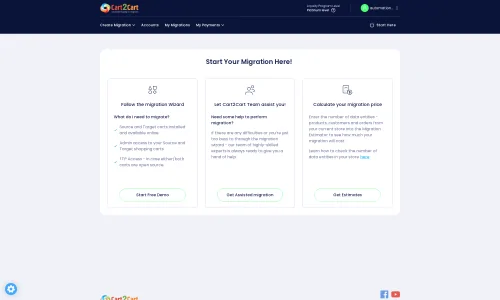
Step 1: Get Started with Your Migration Wizard
Begin by accessing the migration wizard. You can choose to perform a do-it-yourself migration or opt for a managed migration service if you prefer expert assistance. This initial screen helps you determine your preferred path.
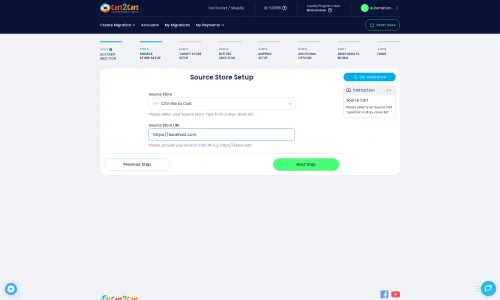
Step 2: Connect Your Source Shoper Store (via CSV)
Since Shoper is not directly supported via API for automated migration, you will select "CSV File to Cart" as your source platform in the wizard. You will then be prompted to upload the CSV files you exported from your Shoper store. This method is effective for transferring essential e-commerce data like products, customers, and orders.
For more information on CSV-based migrations, you can visit our dedicated CSV.File Data Migration service page.
Step 3: Connect Your Target Shopify Store
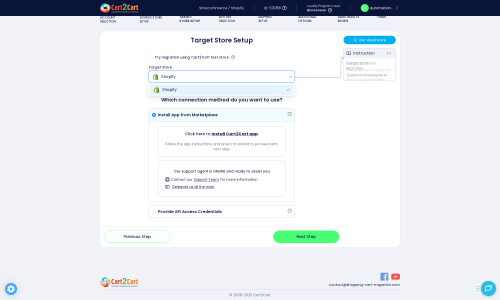
Next, select "Shopify" as your target e-commerce platform. Provide your Shopify store's URL. The recommended connection method is to install the Cart2Cart app directly from the Shopify App Store. Follow the on-screen prompts to establish this connection securely.
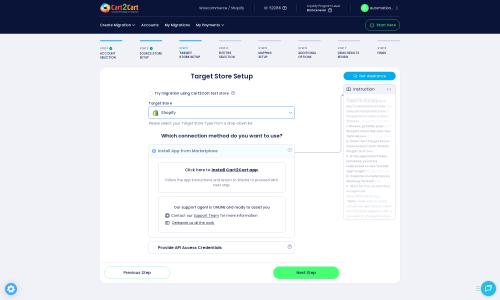
You will typically be redirected to the Shopify Marketplace to install the required app. Once installed and authorized, return to the migration wizard to finalize the connection.
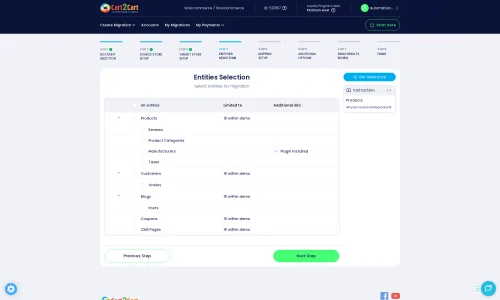
Step 4: Select Data Entities to Migrate
This crucial step allows you to choose which data entities you want to transfer from your Shoper CSV files to your new Shopify store. You can select all available entities or pick specific ones like:
- Products (including SKUs, descriptions, images, variants)
- Product Categories
- Customers
- Orders (including order history and statuses)
- CMS Pages
- Blogs and Blog Posts
- Coupons and Gift Cards
- Product Reviews (note: requires the AirReviews app on Shopify)
Step 5: Configure Additional Options & Data Mapping
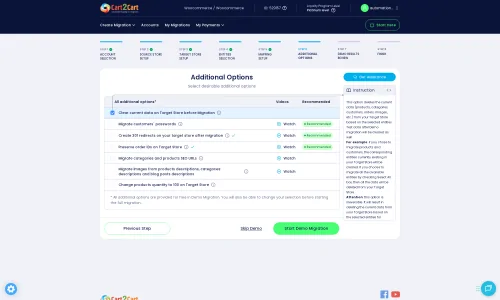
The wizard provides a range of additional options to tailor your migration. For instance, you can choose to:
- Clear Target Store Data: This option clears any existing data on your Shopify store before the migration, ensuring a fresh start.
- Preserve IDs: Opt to preserve product, customer, and order IDs from your source store, which can be useful for internal record-keeping.
- Migrate Images in Description: Ensure product images embedded within descriptions are transferred.
- Create 301 SEO URLs: This is vital for maintaining your SEO rankings and link equity. The tool can automatically create 301 redirects from your old Shoper URLs to the new Shopify URLs.
- Migrate All Categories: Ensure your entire category structure is replicated.
- Migrate Groups to Tags: Convert customer groups into tags on Shopify for easier segmentation.
- Password Migration: If supported by your CSV export, migrate customer passwords for a smoother user experience.
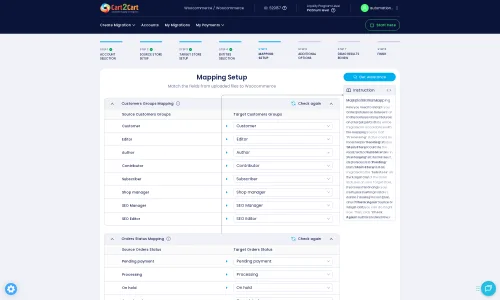
Following additional options, you'll enter the data mapping phase. Here, you'll match your Shoper's customer groups and order statuses to their corresponding equivalents in Shopify, ensuring data consistency across platforms.
Step 6: Run a Free Demo Migration (Optional but Recommended)
Before committing to a full migration, we highly recommend running a free demo migration. This allows you to transfer a limited number of entities (e.g., 10 products, 10 customers, 10 orders) to your Shopify store. It's an excellent opportunity to:
- Review the data transfer accuracy.
- Check the integrity of product descriptions, images, and prices.
- Verify customer accounts and order details.
- Confirm that data mapping works as expected.
A demo migration gives you peace of mind and allows you to make any necessary adjustments before the main event. Learn more about our Migration Preview Service.
Step 7: Launch Full Migration
Once you're satisfied with the demo results, you're ready to proceed with the full migration. Review all your selected options and the total cost. You may also consider adding a Migration Insurance Service, which provides a set number of remigrations for a specified period, offering an extra layer of security. Find out more about How Migration Insurance works?.
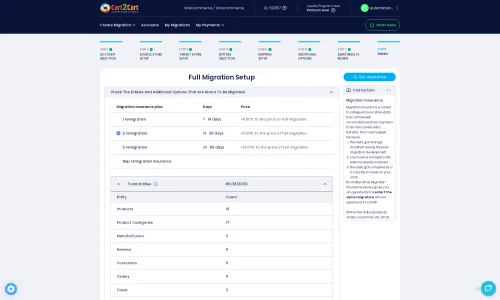
Click the final button to begin the complete data transfer. During this process, you can monitor the migration progress from your account. The platform will handle the heavy lifting, ensuring all your chosen data is accurately moved to Shopify.
Post-Migration Steps
Once your data has been successfully migrated to Shopify, there are several crucial steps to finalize your store's transition and ensure a seamless launch:
- Thoroughly Review Migrated Data: Carefully check all migrated entities on your Shopify store. Verify product details, inventory levels, customer accounts, order history, and other critical information to ensure everything is in place and accurate.
- Configure Your Shopify Store:
- Design and Theme: Customize your Shopify theme to match your brand's aesthetic and provide an optimal user experience.
- Payment Gateways and Shipping: Set up your preferred payment methods and configure shipping zones and rates.
- Install Essential Apps: Install any necessary apps from the Shopify App Store. Remember that migrated reviews will require an app like AirReviews to display correctly.
- Update DNS Records: Once you're confident your new Shopify store is ready, update your domain's DNS records to point to your Shopify store. This is the moment your new store officially goes live.
- Test All Functionality: Perform extensive testing of your store's functionality, including the checkout process, customer account logins, search function, and contact forms.
- Implement 301 Redirects: While the migration tool offers an option to create 301 redirects, double-check that all critical old URLs from Shoper are redirecting correctly to their new Shopify counterparts. This is vital for preserving your SEO rankings and guiding existing customers.
- SEO Optimization: Update your store's meta titles and descriptions on Shopify, and submit your sitemap to search engines (Google Search Console, Bing Webmaster Tools) to help them re-index your new store structure.
- Disable Notifications: Confirm that you have disabled notifications during the migration process as recommended.
- Go Live and Monitor: Announce your new store and closely monitor its performance. Pay attention to site speed, user behavior, and conversion rates, making adjustments as needed.
- Consider Recent Data Migration: If new orders or customer data accumulated on your Shoper store during the migration, utilize the Recent Data Migration Service to transfer this latest information to Shopify without duplicates.
Ways to perform migration from Shoper to Shopify
Automated migration
Just set up the migration and choose the entities to move – the service will do the rest.
Try It Free
Data Migration Service Package
Delegate the job to the highly-skilled migration experts and get the job done.
Choose Package
Custom Migration
Need metafields, SEO URLs, variant rules, or other tailored mapping? Explore customizations built for real merchant demand.
Browse Customizations

Benefits for Store Owners

Benefits for Ecommerce Agencies
Choose all the extra migration options and get 40% off their total Price

The design and store functionality transfer is impossible due to Shoper to Shopify limitations. However, you can recreate it with the help of a 3rd-party developer.

Your data is safely locked with Cart2Cart
We built in many security measures so you can safely migrate from Shoper to Shopify. Check out our Security Policy
Server Security
All migrations are performed on a secure dedicated Hetzner server with restricted physical access.Application Security
HTTPS protocol and 128-bit SSL encryption are used to protect the data being exchanged.Network Security
The most up-to-date network architecture schema, firewall and access restrictions protect our system from electronic attacks.Data Access Control
Employee access to customer migration data is restricted, logged and audited.Frequently Asked Questions
What data entities can be migrated from Shoper to Shopify?
Will my Shoper store go offline during migration to Shopify?
How can I keep SEO rankings when switching from Shoper to Shopify?
Is my store data secure during migration from Shoper to Shopify?
Should I use an automated tool or hire an expert for Shoper to Shopify migration?
What factors influence the cost of Shoper to Shopify migration?
How to transfer Shoper store design and theme to Shopify?
How to ensure data accuracy after migrating from Shoper to Shopify?
Can customer passwords be migrated from Shoper to Shopify?
How long does a Shoper to Shopify store migration take?
Why 150.000+ customers all over the globe have chosen Cart2Cart?
100% non-techie friendly
Cart2Cart is recommended by Shopify, WooCommerce, Wix, OpenCart, PrestaShop and other top ecommerce platforms.
Keep selling while migrating
The process of data transfer has no effect on the migrated store. At all.
24/7 live support
Get every bit of help right when you need it. Our live chat experts will eagerly guide you through the entire migration process.
Lightning fast migration
Just a few hours - and all your store data is moved to its new home.
Open to the customers’ needs
We’re ready to help import data from database dump, csv. file, a rare shopping cart etc.
Recommended by industry leaders
Cart2Cart is recommended by Shopify, WooCommerce, Wix, OpenCart, PrestaShop and other top ecommerce platforms.
Trusted by eCommerce dominators since 2009
















This Shopify Migration App worked great to migrate our store from Volusion to Shopify! It transferred over all product descriptions, photos, categories, etc. seamlessly. It’s very easy to use, and the instructions are very easy to follow. Considering the amount of information that we needed transferred, it did not take as long as we had expected.
We did an initial transfer to test out how things would look and how everything would function. It worked great! We purchased insurance with our migration so that we could re-migrate once our shop was closer to being ready to push live, and customer service has been AMAZING in our requests necessary with our remigration. They are very responsive, very informative, and extremely helpful. I would definitely recommend this service if you are looking to transfer your eCommerce site. Everything has been great! Thank you!
Review source

We had a few false starts, but ultimately I was paired with a great customer service representative who did everything necessary to transfer our products correctly from Wix to Shopify. I will absolutely use this company for future client migrations.
Review source

I contacted Cart2Cart’s help desk (direct chat) and had my questions answered very quickly and very politely. I feel much more confident now with my decision to use Cart2Cart to do the data migration from my existing website to Shopify. I was recommended to Cart2Cart for Shopify Migration by a trusted friend and I will definitely recommend them also to anyone looking to migrate. Moving website providers has been a source of stress for me and at least this is one less thing to worry about.
Review source

I had a great experience with Cart2Cart. Reading some of the negative reviews here says more about how complex ecommerce migration is than anything else. I will say that I highly recommend paying the extra $ for their assisted service, which I did. It is totally work the extra $200 or $300 because you get a project manager who is very available, and you get to tweak your migration settings to make sure everything is just right. With the automated tools they offer, you’re on your own. But their customer support on my project was fast and responsive to my questions, and they were able to make any adjustments I needed. I migrated from Virtuemart to Shopify with over 12,000 orders and 4,000 customers. The migration was smooth. They scheduled the last “new data” import for me at a time I chose (within their working hours). And the migration was a success.
Review source

Fantastic App. We migrated from Volusion to Shopify with no problems. Customer Accounts, Inventory, Sales Orders…everything was transferred over.
The only quirk we had was that passwords didn’t transfer over (I’m sure this is a security issue and I have no problem with it at all). The solution was to just send out a mass e-mail to all of our customers asking them to reset their password. Once they reset their password they would still have their shipping information saved as well as the list of their previous orders.
WOULD HIGHLY RECOMMEND THIS APP…but like any migration process be sure you research & make sure you are doing it the correct way so there are no issues. You can’t blame a vendor for a user mistake 🙂
Review source
My experience with Migration for Shopify was positive. I was explained about the prerequisites and peculiarities for my migration from Magneto to Shopify in a detailed manner. The app is very easy to use. The migration was smooth.
Review source
We migrated a large x-cart site to shopify. This was the only app that could help us migrate hundreds of thousands of orders and customers. They were extremely knowledgeable and responsive. They answered my questions quickly and accurately. The initial migration went smoothly with no errors. The final migration at launch (to bring in the newest orders and customers) went equally as well. Data security was also handled to my satisfaction. Definitely would recommend this app.
Review source
The only company I trust for migrating our websites. We migrated one basic and two plus accounts from Magento to Shopify. The help was amazing. Oleksander was a huge help in making sure everything was right. No reason to do it with any other company. Trust the best.
Review source
Migration for Shopify is exactly what I needed when making the huge decision to migrate my website. By reducing the time needed to import products and orders – I can now focus on design and other very important things to ensure a smooth cart to cart transition.
Review source