
Powerful website, blog as well as online store starts from registering a domain name. It has a huge impact in the way human and search engines perceive a site and can greatly influence shop recognition. The best domain names are those that people can remember since they will protect your identity. Thats why it is really important to keep your domain name after shopping cart migration. Always ensure you have a solid security policy in place during any changes. In this article we are going to explain how to resolve common issues concerning domain names modifications in Magento shopping cart.
It is a common situation while migrating to Magento when e-merchant creates a test subfolder in a root folder. After that, installs a target shopping cart right there. As a result, store owner has a source store in root - www.mystore.com and target store in some subfolder - www.mystore.com/targetstore/. Accordingly, after migration is completed, target store will be located in a subfolder. Migrating SEO URLs carefully is crucial for preserving search rankings. Consequently, merchants face a dilemma. They want customers to type the www.mystore.com and see the live target store instead of typing www.mystore.com/targetstore.
So, how to solve this dilemma?
First of all you should enter your admin panel and go to System -> Config -> Web. There you will see settings for your “base URL”, which you will have to update.
Step 1. Set the default store to the proper “base URL”
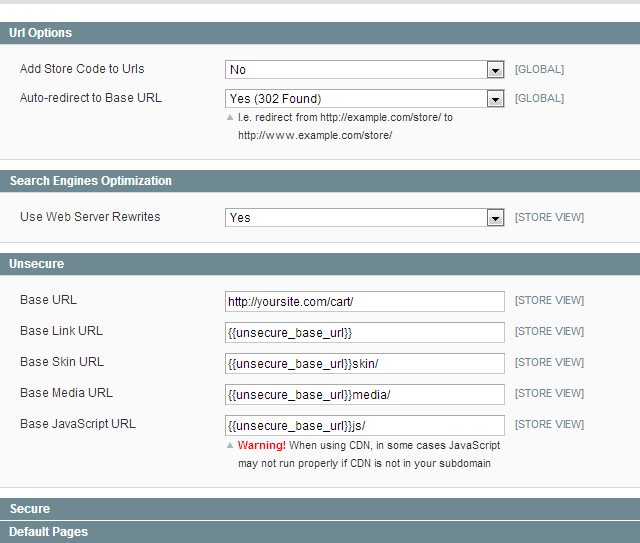
Please take into a consideration that the “base URL” has the subfolder defined.
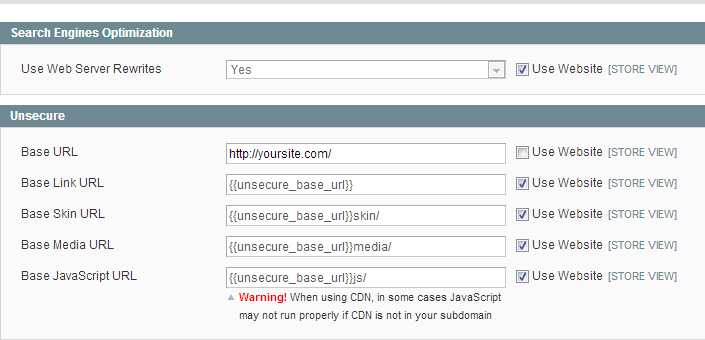
Step 2: Set your store view “base URL” to the “root URL”
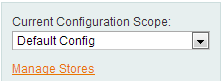
On the left you will see a drop down list where you will have to change the "Current configuration scope" to your store view (choose not default one).
After that you have to change the “base URL” value. To do that simply uncheck 'use website' and enter your new “base URL”:
Also, double-check in the same screen that your Session file management cookie path is set to the root folder of your site and that the domain is correct:

Step 3. Copy files to your root directory
Last but not least. You will have to copy the index.php file, .htaccess file, and symlink your media, skin and js folders to your root directory, since they are only available to your subfolder Magento base install right now - you will need to let your main domain know where to look for Magento! From secure shell in your Magento installation directory www.mystore.com/targetstore as sudoer:
sudo cp index.php ../
sudo cp .htaccess ../
sudo ln -s js ../
sudo ln -s skin ../
sudo ln -s media ../
Note, your admin will still be available at mystore.com/targetstore/admin
Edit your index.php file in this main webroot (the file you just copied) and update it around line 45:
$targetstoreFilename = 'app/Targetstore.php';Change this to:
$targetstoreFilename = 'cart/app/Targetstore.php';
Where 'targetstore' is the subfolder. Finally, you need to clear the cache for these changes to take effect.
Please take into consideration, such procedure will be suitable only in case you use the same server.
Need to move store database from one Magento to Magento migration store to a completely another one? Try out automated Magento migration using Cart2Cart, and get your data transferred in terms of several hours! For deeper insights into managing your migration, explore our migration insurance service for peace of mind, get a migration preview, or review our pre-migration tips.
Monthly Update – March 2026
For March 2026, a pivotal strategy in e-commerce optimization, especially following a significant architectural change like moving Magento to a root directory, involves the robust application of advanced analytics for performance validation and continuous improvement. Beyond mere operational checks, gaining a granular understanding of the impact on user behavior necessitates deep dives into metrics such as bounce rates, conversion funnel efficacy, and precise page load speeds. These should be meticulously segmented by device type, traffic source, and geographical location. Modern analytics platforms, particularly Google Analytics 4 (GA4), provide sophisticated capabilities for tracking these crucial indicators, empowering store owners to pinpoint even subtle shifts in customer journeys. We strongly advocate for the establishment of custom dashboards dedicated to monitoring key performance indicators (KPIs) directly relevant to your domain transition. This proactive and data-driven approach to analysis is instrumental in ensuring that the underlying architectural enhancements genuinely translate into measurable business benefits, concurrently guiding future SEO adjustments and user experience refinements. Therefore, the imperative isn't just to complete the migration; it is to rigorously validate and ceaselessly optimize with actionable, data-driven insights. Meticulous post-migration checks, thoroughly informed by comprehensive analytics, are absolutely vital for achieving sustained online growth and maintaining a competitive edge.
For more details, explore our FAQ section or schedule a call with a migration expert.