


Rakuten to CubeCart Migration - Step-by-Step Guide & Expert Services
Rakuten to CubeCart migration doesn't have to be complex. Ready to move Rakuten store to CubeCart? Cart2Cart provides a lightning-fast, secure way to transfer data, ensuring zero downtime and complete SEO preservation. Seamlessly switch from Rakuten to CubeCart, keeping all your product and customer information intact. Explore our comprehensive step-by-step guide for a confident DIY approach, or leverage our expert service for a completely hands-free Rakuten to CubeCart migration.
What data can be
migrated from Rakuten to CubeCart
-
Products
-
Product Categories
-
Manufacturers
-
Customers
-
Orders
- Name, ID, SKU, Short Description, Full Description, Manufacturer, Tax Class, Sort Order.
- MSRP.
- Meta Title, Meta Keywords, Meta Description.
- Quantity, Stock Availability.
- Weight.
- Options(Name, Price).
- Name, ID, Status.
- Meta Title, Meta Description, Meta Keywords.
- Name, Meta Title.
- ID, Telephone, Newsletter, Gender, Created Date.
- Customer Billing Address.
- Customer Shipping Address.
- ID, Order Date, Order Status, SubTotal Price, Discount Price, Tax Price, Shipping Price, Total Price.
- Customer Name, Email, Telephone, Billing Address.
- Shipping Address.
- Name, ID, SKU, Short Description, Full Description, Manufacturer, Tax Class, Sort Order.
- MSRP.
- Meta Title, Meta Keywords, Meta Description.
- Quantity, Stock Availability.
- Weight.
- Options(Name, Price).
- Name, ID, Status.
- Meta Title, Meta Description, Meta Keywords.
- Name, Meta Title.
- ID, Telephone, Newsletter, Gender, Created Date.
- Customer Billing Address.
- Customer Shipping Address.
- ID, Order Date, Order Status, SubTotal Price, Discount Price, Tax Price, Shipping Price, Total Price.
- Customer Name, Email, Telephone, Billing Address.
- Shipping Address.
Products
Estimate your Migration Cost
Cart2Cart will seamlessly migrate Rakuten to CubeCart ecommerce data like products, orders, customers, etc. in just a few hours with zero influence on your current Rakuten store performance.
How to Migrate from Rakuten to CubeCart In 3 Steps?
Connect your Source & Target carts
Choose Rakuten and CubeCart from the drop-down lists & provide the stores’ URLs in the corresponding fields.
Select the data to migrate & extra options
Choose the data you want to migrate to CubeCart and extra options to customise your Rakuten to CubeCart migration.
Launch your Demo/Full migration
Run a free Demo to see how the Cart2Cart service works, and when happy - launch Full migration.
Migrate from Rakuten to CubeCart: A Step-by-Step E-commerce Platform Transition Guide
A Comprehensive Guide to Transitioning from Rakuten to CubeCart
Moving your e-commerce store is a significant undertaking, but with the right strategy and tools, it can be a seamless journey. This guide provides a detailed walkthrough for merchants looking to transfer their online store data from Rakuten to CubeCart, a robust and flexible shopping cart platform. While Rakuten generally operates as a marketplace, this guide will focus on migrating your product and customer data by exporting it into CSV files, then importing it into your new CubeCart store. We’ll leverage an automated migration service to ensure data integrity and minimize downtime.
A successful replatforming can unlock new features, improve scalability, and enhance the user experience for both you and your customers. CubeCart offers extensive customization and control, making it an excellent choice for merchants seeking more autonomy over their online presence.
Prerequisites for Migration
Before you begin the data transfer process, ensure you have the following in place:
- Rakuten Data Export: As Rakuten is primarily a marketplace and not a traditional e-commerce platform with direct API access for migration tools, you will need to export your store data (products, customers, orders, etc.) into CSV files. Ensure these files are well-organized and contain all necessary information for a smooth import. You might need to consult Rakuten's seller documentation or support for the best way to export your specific data.
- CubeCart Store Ready: Have your new CubeCart store installed and operational on a hosting server. You should have administrative access to the backend, including FTP/SFTP access to its root folder. For assistance, refer to our guide on how to prepare your target store for migration.
- Cart2Cart Migration Module for CubeCart: CubeCart requires the installation of a specific migration module. This module, often referred to as a "bridge" connector, facilitates the secure and efficient data transfer between your CSV files and your CubeCart database. Ensure you download and install the Cart2Cart CubeCart Migration module onto your CubeCart installation.
- Access Credentials: Have your CubeCart admin login details (username, password, URL) and FTP/SFTP credentials ready.
- Backup Your Data: Always create a full backup of your existing Rakuten data (CSV exports) and your new CubeCart database before initiating any major changes.
Performing the Migration: A Step-by-Step Guide
Follow these steps to efficiently migrate your store data from Rakuten (via CSV) to CubeCart using an automated migration service.
Step 1: Get Started
Navigate to the migration service's website. You'll typically find an intuitive interface designed to guide you through the process.
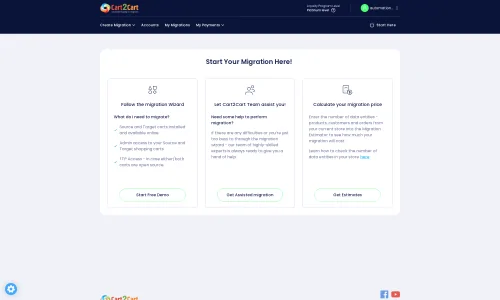
Click on the "Start Migration" or similar button to begin the wizard.
Step 2: Connect Your Source Store (Rakuten via CSV)
Since direct Rakuten integration isn't available, you will select "CSV File to Cart" as your source platform. This method allows you to transfer data that you've exported from Rakuten.
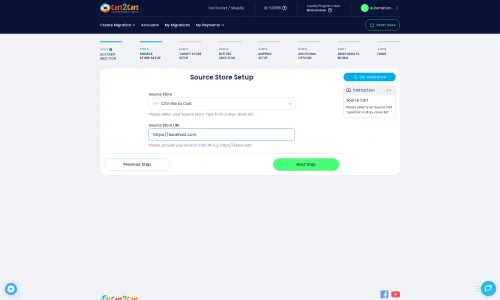
Upload your prepared CSV files containing your product data, customer information, orders, and other entities. The system will guide you through the file upload process and validate the file structure. For more details on this process, see our CSV File Data Migration service.
Step 3: Connect Your Target Store (CubeCart)
Next, select "CubeCart" as your target shopping cart from the dropdown menu.
You will be prompted to provide the URL of your CubeCart store. Since CubeCart uses a bridge connection, you'll need to upload the Cart2Cart bridge file to your CubeCart's root directory. The system will provide clear instructions and usually a downloadable bridge file. Uploading the bridge file is crucial for the migration tool to securely communicate with your CubeCart database. If you're unsure about the root folder, check our FAQ on what a root folder is.
After uploading, verify the connection. The system will confirm successful establishment, ensuring a secure data transfer channel.
Step 4: Select Data Entities
This is where you choose precisely what data you want to move from your Rakuten CSV files to CubeCart. Common entities include:
- Products: Including SKUs, product descriptions, images, prices, variants, and product categories.
- Product Categories: The hierarchical structure of your store's categories.
- Customers: Customer accounts, addresses, and associated data.
- Orders: Purchase history, order statuses, and associated customer details.
- Manufacturers: Brand information.
- Product Reviews: Customer feedback and ratings.
- CMS Pages: Static content like "About Us" or "Contact Us" pages.
- Coupons: Discount codes and promotions.
- Taxes: Tax rules and rates.
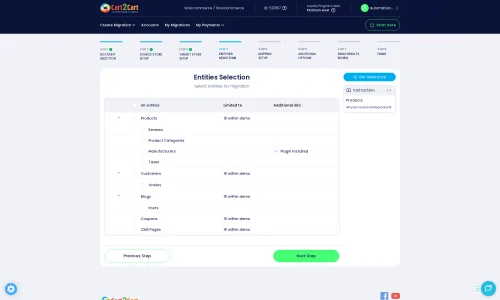
You can select "All entities" or pick specific ones based on your needs.
Step 5: Configure Additional Options
Enhance your migration with a range of additional options designed to preserve SEO, maintain data integrity, and customize the transfer. For CubeCart, key options include:
- Migrate Images in Description: Ensures that all product description images are transferred.
- Clear Target Store Data: Useful if you want to remove any existing placeholder data from your new CubeCart store before migration. Learn more about the "Clear Target" option.
- Preserve Product IDs, Order IDs, Customer IDs: Maintains the original IDs from your Rakuten data in CubeCart, which can be crucial for inventory management and order fulfillment systems. Find out how Preserve IDs options work.
- Create 301 Redirects: Automatically creates redirects from your old Rakuten product/category URLs to the new CubeCart URLs, preventing broken links and preserving your SEO rankings and link equity.
- Migrate Invoices: Transfers your invoice records.
- Password Migration: Migrates customer passwords securely, allowing customers to log into their new CubeCart accounts with their existing credentials.
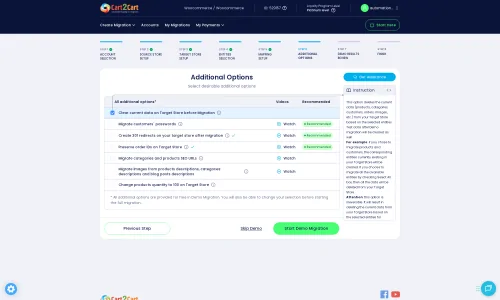
Select the options that best suit your migration strategy. Note that CubeCart may have certain limitations, such as "SEO options excluded for blogs," which will be handled automatically by the migration tool.
Step 6: Map Data Fields
This critical step ensures that your Rakuten data fields correctly align with CubeCart's structure. You'll typically map customer groups (e.g., "Guest" to "Customer") and order statuses (e.g., "Pending" to "Processing" or "Complete"). The system often provides intelligent auto-mapping, but you should review and adjust as needed.
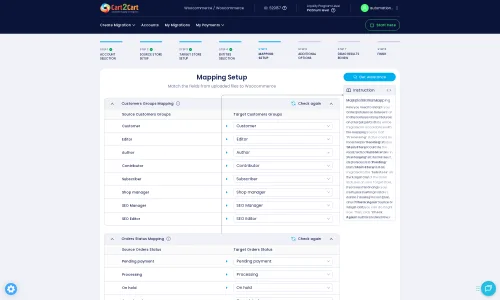
Accurate data mapping is vital for maintaining data integrity and ensuring a consistent user experience on your new store.
Step 7: Perform a Demo Migration (Optional but Recommended)
Before committing to a full migration, run a free demo migration. This transfers a limited number of entities (e.g., 10-20 products, customers, orders) to your CubeCart store. It allows you to:
- Test the connection and ensure data is transferred correctly.
- Review the data in your CubeCart backend to confirm accuracy and formatting.
- Identify and resolve any potential issues before the full transfer.
The demo is a valuable migration preview service that helps fine-tune your settings.
Step 8: Initiate Full Migration
Once you are satisfied with the demo results, proceed with the full migration. This will transfer all selected data entities from your Rakuten CSV files to your CubeCart store. You can also select a Migration Insurance Plan at this stage, which provides options for re-migrations in case you need further adjustments. Learn more about how Migration Insurance works.
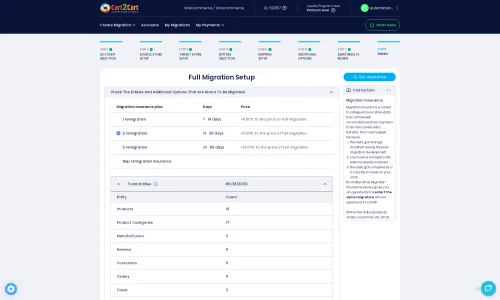
The migration process runs on Cart2Cart's secure servers, so you can close your browser or turn off your computer. You will receive an email notification once the migration is complete.
Post-Migration Steps
After the data transfer to CubeCart is complete, there are several crucial steps to ensure your new store is fully optimized and ready for customers:
- Thorough Data Verification: Rigorously check all migrated data in your CubeCart store. Confirm product details, images, prices, customer accounts, order histories, and CMS pages are accurate.
- Test Store Functionality: Conduct extensive testing of your CubeCart store's critical functions. Place test orders, register new customer accounts, apply coupons, and ensure payment gateways are working correctly.
- Configure SEO and Redirects: Verify that 301 redirects are properly implemented to maintain your existing search engine rankings. Check for any broken links and manually configure additional redirects if necessary.
- Theme and Design Adjustments: Customize your CubeCart theme to match your brand's aesthetics and ensure a consistent user experience.
- Install Essential Plugins/Modules: Install and configure any necessary CubeCart modules for features like analytics, marketing, shipping, or additional payment options.
- Update Third-Party Integrations: Reconnect any third-party services (e.g., ERP, CRM, email marketing platforms, accounting software) with your new CubeCart store.
- Inform Your Customers: Announce the migration to your customers, explaining any changes and encouraging them to explore your new and improved store.
- Monitor Performance: Keep a close eye on your CubeCart store's performance, site speed, and user feedback in the weeks following the launch.
By following these steps, you can ensure a successful and smooth transition from Rakuten to CubeCart, setting your business up for future growth and enhanced online presence. If you encounter any challenges or require expert assistance, our team is always ready to provide support. You can always contact us for specialized migration customization service or consult our Frequently Asked Questions.
Ways to perform migration from Rakuten to CubeCart
Automated migration
Just set up the migration and choose the entities to move – the service will do the rest.
Try It Free
Data Migration Service Package
Delegate the job to the highly-skilled migration experts and get the job done.
Choose Package

Benefits for Store Owners

Benefits for Ecommerce Agencies
Choose all the extra migration options and get 40% off their total Price

The design and store functionality transfer is impossible due to Rakuten to CubeCart limitations. However, you can recreate it with the help of a 3rd-party developer.

Your data is safely locked with Cart2Cart
We built in many security measures so you can safely migrate from Rakuten to CubeCart. Check out our Security Policy
Server Security
All migrations are performed on a secure dedicated Hetzner server with restricted physical access.Application Security
HTTPS protocol and 128-bit SSL encryption are used to protect the data being exchanged.Network Security
The most up-to-date network architecture schema, firewall and access restrictions protect our system from electronic attacks.Data Access Control
Employee access to customer migration data is restricted, logged and audited.Frequently Asked Questions
How is data security ensured during my Rakuten to CubeCart migration?
Is it possible to transfer my Rakuten store's design and theme to CubeCart?
What data entities are typically transferred from Rakuten to CubeCart?
Should I use an automated tool or hire an expert for Rakuten to CubeCart migration?
Will my Rakuten store experience downtime during migration to CubeCart?
How can I preserve SEO rankings when migrating from Rakuten to CubeCart?
What is the estimated timeline for a Rakuten to CubeCart store migration?
What factors determine the cost of migrating my store from Rakuten to CubeCart?
How do I verify the accuracy of data after migrating from Rakuten to CubeCart?
Can customer passwords be securely migrated from Rakuten to CubeCart?
Why 150.000+ customers all over the globe have chosen Cart2Cart?
100% non-techie friendly
Cart2Cart is recommended by Shopify, WooCommerce, Wix, OpenCart, PrestaShop and other top ecommerce platforms.
Keep selling while migrating
The process of data transfer has no effect on the migrated store. At all.
24/7 live support
Get every bit of help right when you need it. Our live chat experts will eagerly guide you through the entire migration process.
Lightning fast migration
Just a few hours - and all your store data is moved to its new home.
Open to the customers’ needs
We’re ready to help import data from database dump, csv. file, a rare shopping cart etc.
Recommended by industry leaders
Cart2Cart is recommended by Shopify, WooCommerce, Wix, OpenCart, PrestaShop and other top ecommerce platforms.
Trusted by eCommerce dominators since 2009















Very impressed with cart2cart. We used it to migrate userbase and productbase from OsCommerce to Cubecart. Excellent support – even when dealing with a database issue in one of the carts, not really to do with cart2cart! I would recommend.
Review source

Great Solution! Excellent Support team which helped to migrate my store data from Magento to Bigcommerce in no time. Cart2Cart developed a custom solution to which helped me to Migrate my Blog Data too. I will surely use their service on my upcoming projects.
Review source

Migration from Shopify to BigCommerce was exactly what I need it. Customers information, orders, products description and images were displayed in my new platform perfectly. Additionally, the support team were very helpful and patience while I was doing all of this process. I highly recommend it!
Review source

Working with Cart2Cart on a recent Yahoo Store to BigCommerce Store migration was a pleasure. The support was very helpful in getting to my end solution. I would definitely recommend their service for anyone looking to migrate data between these platforms.
Review source

Solid work on the cart2cart migration from Magento to BigCommerce! Also, they helped me a lot for the data re-migration due to an accidental deletion on BigCommerce I definitely would recommend Cart2Cart 🙂
Review source

I have been very happy with the service and support of Cart2Cart in migrating from an older WebAsyst based e-commerce site to a much more modern CS-Cart based one. Worked perfectly!
Review source
Very good support. They migrated our store from Big Cartel to Magento, and were very cooperative during all this process. Thank you team. I recommend them to everyone
Review source
I have successfully used Cart2Cart to migrate products & categories from DrupalCommerce to Magento. It’s easy, affordable and they offer decent support (no I’m not affiliated with them).
Review source
we have already contracted the service three times to migrate from prestashop to magento. We were very well catered for. I recommend!
Review source
Many of my customers have Magento 1 stores. This year Magento will stop supporting this system and because of this these customers need to migrate to another system. Migration can be difficult and very time consuming process. But then i found Cart2Cart. There solution is the best and affordable. With the first migration there where some problems, but i did made some mistakes with filling in the correct fields to get a connection between the current and the target store. After starting a chat these problems where fixed very quickly. Support is very good and there solution is very affordable. The perfect solution!
Review source