
Merchium to PrestaShop Migration - Step-by-Step Guide & Expert Services
Merchium to PrestaShop migration doesn't have to be complicated. Easily move Merchium store to PrestaShop with Cart2Cart's secure, fast service. We help you switch from Merchium to PrestaShop while preserving your SEO and ensuring zero downtime. Our automated tool meticulously handles all your data transfer. Get a step-by-step guide for DIY migration, or let our experts handle your complete Merchium to PrestaShop migration for a stress-free transition. Your business deserves a seamless upgrade.
What data can be
migrated from Merchium to PrestaShop
-
Products
-
Product Categories
-
Manufacturers
-
Taxes
-
Customers
-
Orders
-
Coupons
-
Reviews
-
Multiple Languages
- Name, SKU, Short Description, Full Description, Status, Manufacturer, Tax Class.
- Price, Special Price, Special Price From-To Date, Tier Price.
- Meta Title, Meta Keywords, Meta Description.
- Product Image, Additional Images.
- Quantity, Stock Availability.
- Weight, Width, Height.
- Product Tags.
- Options(Name, Price), Product Attributes(Name, Values).
- Product Variants(SKU, Weight, Price, Special Price, Additional image, Special Price From-To Date).
- Downloadable Products(Files, Expiration Date).
- Name, Description, Status.
- Meta Title, Meta Description, Meta Keywords.
- Category Images.
- Name, Description, Manufacturer Images.
- Tax Class(Name), Tax Rates(Percent), Tax Rules(Tax Class, Tax Rate).
- ID, First Name, Last Name, Email, Customer Group, Created Date.
- Customer Billing Address(First Name, Last Name, Company, Address 1, Address 2, Country, State, City, Zip Code, Telephone).
- Customer Shipping Address(First Name, Last Name, Company, Address 1, Address 2, Country, State, City, Zip Code, Telephone).
- ID, Order Date, Order Status, Order Products(Name, SKU), Product Price, Quantity, SubTotal Price, Discount Price, Tax Price, Shipping Price, Total Price, Order Comments.
- Customer Name, Email, Billing Address(First Name, Last Name, Company, Address 1, Address 2, Country, State, City, Zip Code, Telephone).
- Shipping Address(First Name, Last Name, Company, Address 1, Address 2, Country, State, City, Zip Code, Telephone).
- Name, Description, Status, Coupon From Date, Coupon To Date, Type Discount, Discount Amount, Coupon Expire Date.
- Created Date , Status , Rate , User Name , Comment , Product .
- Yes.
- Name, SKU, Short Description, Full Description, Status, Manufacturer, Tax Class.
- Price, Special Price, Special Price From-To Date, Tier Price.
- Meta Title, Meta Keywords, Meta Description.
- Product Image, Additional Images.
- Quantity, Stock Availability.
- Weight, Width, Height.
- Product Tags.
- Options(Name, Price), Product Attributes(Name, Values).
- Product Variants(SKU, Weight, Price, Special Price, Additional image, Special Price From-To Date).
- Downloadable Products(Files, Expiration Date).
- Name, Description, Status.
- Meta Title, Meta Description, Meta Keywords.
- Category Images.
- Name, Description, Manufacturer Images.
- Tax Class(Name), Tax Rates(Percent), Tax Rules(Tax Class, Tax Rate).
- ID, First Name, Last Name, Email, Customer Group, Created Date.
- Customer Billing Address(First Name, Last Name, Company, Address 1, Address 2, Country, State, City, Zip Code, Telephone).
- Customer Shipping Address(First Name, Last Name, Company, Address 1, Address 2, Country, State, City, Zip Code, Telephone).
- ID, Order Date, Order Status, Order Products(Name, SKU), Product Price, Quantity, SubTotal Price, Discount Price, Tax Price, Shipping Price, Total Price, Order Comments.
- Customer Name, Email, Billing Address(First Name, Last Name, Company, Address 1, Address 2, Country, State, City, Zip Code, Telephone).
- Shipping Address(First Name, Last Name, Company, Address 1, Address 2, Country, State, City, Zip Code, Telephone).
- Name, Description, Status, Coupon From Date, Coupon To Date, Type Discount, Discount Amount, Coupon Expire Date.
- Created Date , Status , Rate , User Name , Comment , Product .
- Yes.
Products
Estimate your Migration Cost
Thanks to Cart2Cart`s flexible pricing policy, the migration price depends on the number of transferred entities and the additional migration options you select. Simply choose your Source and Target platforms and get the approximate price of your Merchium to PrestaShop store conversion right after completing the free Demo.
How to Migrate from Merchium to PrestaShop In 3 Steps?
Connect your Source & Target carts
Choose Merchium and PrestaShop from the drop-down lists & provide the stores’ URLs in the corresponding fields.
Select the data to migrate & extra options
Choose the data you want to migrate to PrestaShop and extra options to customise your Merchium to PrestaShop migration.
Launch your Demo/Full migration
Run a free Demo to see how the Cart2Cart service works, and when happy - launch Full migration.
Migrating from Merchium to PrestaShop: Your Comprehensive How-To Guide
A Seamless Transition: Moving Your E-commerce Store from Merchium to PrestaShop
As your online business evolves, the need for a more flexible, scalable, and feature-rich e-commerce platform often arises. Migrating from Merchium to PrestaShop can be a strategic move, offering greater control over your store's design, functionality, and overall user experience. PrestaShop, a powerful open-source solution, provides a robust foundation for growth, allowing you to customize nearly every aspect of your online presence.
This comprehensive guide will walk you through each step of replatforming your store, ensuring a smooth and efficient data transfer. We'll cover everything from initial preparations to post-migration checks, helping you maintain data integrity and SEO rankings throughout the transition.
Prerequisites for a Successful Migration
Before embarking on your data migration journey, a few essential preparations are necessary to ensure a seamless transition and prevent potential issues. Properly setting up both your source (Merchium) and target (PrestaShop) stores will lay the groundwork for a successful move.
For Your Merchium Source Store:
- API Access: Merchium requires API access for data extraction. You will need to obtain specific API credentials, including a
clientId,clientSecret,refreshToken,storeId,adminEmail, andadminPwd. This often involves custom app development within Merchium to ensure the necessary API scopes and an Admin API access token are available. - HTTPS Enabled: Your Merchium store must be accessible via HTTPS for secure API communication.
- Cart2Cart Merchium Migration App: Ensure you have the necessary Cart2Cart Merchium Migration App configured or installed, as this is typically required for API-based data extraction.
- Data Review: Perform a thorough review of your existing data, including products (SKUs, variants), customer information, orders, and CMS pages, to identify any inconsistencies or data that might need cleaning before the transfer.
For Your PrestaShop Target Store:
- PrestaShop Installation: You need a fresh installation of PrestaShop on your chosen hosting environment. Ensure it's up-to-date with a supported version (e.g., 0.9.0 to 1.6.1.0).
- Admin Access: Full administrative access to your PrestaShop store, including the admin URL, login, and password, is crucial.
- Cart2Cart Universal PrestaShop Migration Module: The Cart2Cart Universal PrestaShop Migration module must be installed on your PrestaShop store to facilitate the connection via bridge.
- Bridge Location: Be prepared to upload a Connection Bridge file to your PrestaShop store's root directory, or provide credentials for its automatic upload.
- Hosting Environment: Ensure your hosting environment meets PrestaShop's requirements and has sufficient resources to handle your migrated data.
- Backups: Always create a full backup of your existing Merchium store data before starting any migration process. This is a critical step for data recovery in unforeseen circumstances.
By addressing these prerequisites, you'll establish a solid foundation for a smooth and successful migration, minimizing potential downtime and data integrity issues.
Performing the Migration: A Step-by-Step Guide
Transferring your e-commerce data from Merchium to PrestaShop involves a structured approach, typically guided by an automated migration wizard. Follow these steps to ensure all your essential entities—from products and customer data to orders and reviews—are moved securely.
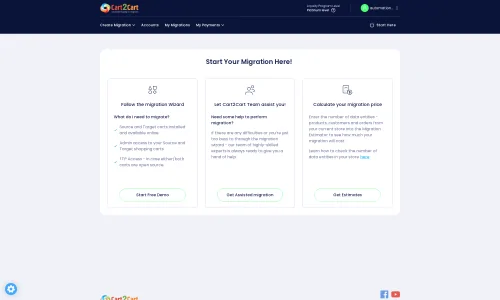
Step 1: Initiate Your Migration
Begin by navigating to the migration service platform. This initial step allows you to choose your migration path, whether it's a DIY approach with the wizard or a guided service.
Step 2: Configure Your Merchium Source Store
Next, you'll specify Merchium as your source platform. Since Merchium connects via API, you will be prompted to provide your API credentials. This includes your clientId, clientSecret, refreshToken, storeId, adminEmail, and adminPwd. These details enable the migration tool to securely access and extract your store’s data. Remember that setting up API access might require prior custom app development on the Merchium side, as indicated by its limitations.
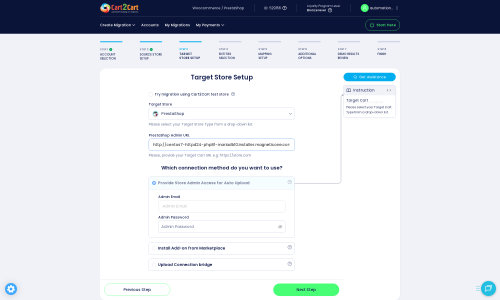
Step 3: Set Up Your PrestaShop Target Store
Now, select PrestaShop as your target platform. You'll need to provide your PrestaShop Admin URL. The connection method for PrestaShop is via a Connection Bridge. You can typically choose to provide your admin credentials, allowing the system to automatically upload the necessary bridge file and install the Cart2Cart Universal PrestaShop Migration module, or you can manually upload the bridge to your store's root directory.
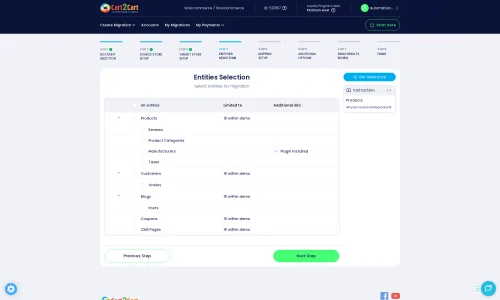
Step 4: Select Data Entities for Transfer
This crucial step allows you to define exactly which data entities you wish to move from Merchium to PrestaShop. Merchium supports the migration of Products, Product Categories, Product Reviews, Customers, Orders, CMS Pages, Gift Cards, Coupons, and Blog Posts. PrestaShop supports these, along with Manufacturers, Invoices, Taxes, and Blogs. You can select all available entities or choose specific ones based on your business needs.
Step 5: Configure Additional Migration Options
Enhance your data transfer with a range of additional options designed to preserve data integrity and SEO. Consider these valuable choices:
- Clear Target Store Data: The option to clear current data on the target store before migration is useful for fresh installations.
- Preserve IDs: Opt to preserve Product, Order, and Customer IDs to maintain historical data consistency.
- 301 Redirects: Create 301 SEO URLs automatically to ensure your old URLs point to your new PrestaShop pages, preserving valuable link equity and SEO rankings.
- Password Migration: Migrate customer passwords for a seamless login experience on your new PrestaShop store.
- Migrate Images in Description: Ensure all product and category images embedded within descriptions are transferred.

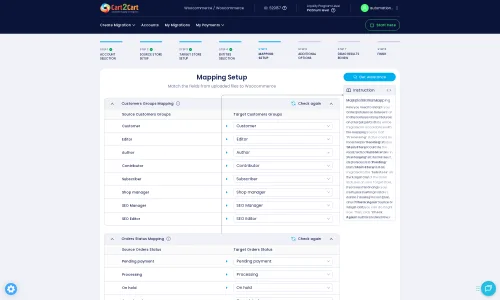
Step 6: Map Data Fields
Data mapping is essential for ensuring consistency between your Merchium and PrestaShop stores. This step typically involves matching customer groups and order statuses from your source platform to their corresponding equivalents in PrestaShop. Accurate mapping ensures that customer roles and order lifecycles are correctly maintained after the transition.
Step 7: Run a Demo and Full Migration
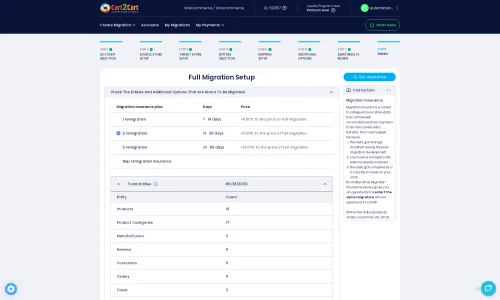
Before committing to the full migration, it's highly recommended to perform a free demo migration. This allows you to transfer a limited number of entities to your PrestaShop store, giving you an opportunity to review the results and ensure everything is transferring as expected. Once satisfied, you can proceed with the full migration. Consider adding a Migration Insurance Plan, which offers additional remigrations and support, providing peace of mind during the transition.
Post-Migration Steps
Once your data has successfully been transferred from Merchium to PrestaShop, the migration process isn't quite complete. Several critical post-migration tasks are necessary to ensure your new store is fully functional, optimized for performance, and ready for your customers.
- Thorough Testing: Conduct extensive testing of your PrestaShop store. Verify that all products (SKUs, variants) are displayed correctly, customer accounts are accessible, orders are accurate, and the checkout process functions flawlessly. Test all payment gateways, shipping options, and any custom functionalities.
- Update DNS Settings: If you are using the same domain name, update your DNS records to point to your new PrestaShop hosting. Be aware that DNS propagation can take up to 48 hours.
- Verify 301 Redirects: Confirm that all 301 redirects are working as intended. This is vital for maintaining your SEO rankings and ensuring a smooth user experience by preventing broken links.
- Configure Payment & Shipping: Set up and thoroughly test all your preferred payment methods and shipping carriers directly within your PrestaShop admin panel.
- Install Essential Modules & Themes: Install any necessary PrestaShop modules (plugins) for features like SEO optimization, caching, security, or analytics. Customize your chosen PrestaShop theme to align with your brand identity.
- Update Integrations: Reconnect any third-party integrations such as accounting software, CRM systems, or marketing automation tools.
- Google Search Console & Analytics: Update your website's address in Google Search Console and other webmaster tools. Monitor Google Analytics for any unexpected drops in traffic, which could indicate SEO issues.
- Remove Old Store: Once you are completely satisfied with your new PrestaShop store's performance and data integrity, you can consider decommissioning your old Merchium store.
- Announce Your New Store: Inform your customers about your upgraded online store! Highlight the new features, improved user experience, and any special offers to celebrate your successful transition.
By meticulously executing these post-migration steps, you'll ensure a seamless experience for your customers and position your PrestaShop store for continued success. For further assistance or complex migration scenarios, consider exploring services like Recent Data Migration or consulting our Frequently Asked Questions.
Ways to perform migration from Merchium to PrestaShop
Automated migration
Just set up the migration and choose the entities to move – the service will do the rest.
Try It Free
Data Migration Service Package
Delegate the job to the highly-skilled migration experts and get the job done.
Choose Package
Custom Migration
Need metafields, SEO URLs, variant rules, or other tailored mapping? Explore customizations built for real merchant demand.
Browse Customizations

Benefits for Store Owners

Benefits for Ecommerce Agencies
Choose all the extra migration options and get 40% off their total Price

The design and store functionality transfer is impossible due to Merchium to PrestaShop limitations. However, you can recreate it with the help of a 3rd-party developer.

Your data is safely locked with Cart2Cart
We built in many security measures so you can safely migrate from Merchium to PrestaShop. Check out our Security Policy
Server Security
All migrations are performed on a secure dedicated Hetzner server with restricted physical access.Application Security
HTTPS protocol and 128-bit SSL encryption are used to protect the data being exchanged.Network Security
The most up-to-date network architecture schema, firewall and access restrictions protect our system from electronic attacks.Data Access Control
Employee access to customer migration data is restricted, logged and audited.Frequently Asked Questions
Will my Merchium store experience downtime during migration to PrestaShop?
Can customer passwords be migrated from Merchium to PrestaShop?
Should I use an automated tool or hire an expert for Merchium to PrestaShop migration?
How long does a Merchium to PrestaShop migration take?
What factors influence the cost of migrating from Merchium to PrestaShop?
How to prevent losing SEO rankings when migrating from Merchium to PrestaShop?
Is my Merchium store data secure during the migration to PrestaShop?
Can my Merchium store design be transferred directly to PrestaShop?
What data entities can be migrated from Merchium to PrestaShop?
How can I ensure data accuracy after migrating from Merchium to PrestaShop?
Why 150.000+ customers all over the globe have chosen Cart2Cart?
100% non-techie friendly
Cart2Cart is recommended by Shopify, WooCommerce, Wix, OpenCart, PrestaShop and other top ecommerce platforms.
Keep selling while migrating
The process of data transfer has no effect on the migrated store. At all.
24/7 live support
Get every bit of help right when you need it. Our live chat experts will eagerly guide you through the entire migration process.
Lightning fast migration
Just a few hours - and all your store data is moved to its new home.
Open to the customers’ needs
We’re ready to help import data from database dump, csv. file, a rare shopping cart etc.
Recommended by industry leaders
Cart2Cart is recommended by Shopify, WooCommerce, Wix, OpenCart, PrestaShop and other top ecommerce platforms.
Trusted by eCommerce dominators since 2009















Great service which allowed us to transfer products, customers and orders database of our customer from Virtuemart to Prestashop 2 times: a first time in order to prepare the new website and a second time in order to update new customers and new orders placed in the meantime. Without Cart2Cart this would have been more complicated… A great customer service also, very available and very competent. Thanks to them
Review source

Great Service, and great support team. Used for a migration from Magento to PrestaShop, it works like a charm.
Review source

Tiene un servicio online que me ha salvado la vida. Y de momento todo a funcionado perfecto migrando de woocommerce a prestashop. Me han facilitado la vida y me han alegrado el día
Review source

Cart2Cart helped me with several PrestaShop migrations. They always give good support, ready to listen and help if needed. I migrated several stores with 15000 products, with no problem.
This is the best migration tool I know.
Review source
This was the only service that worked for X-Cart5 to PrestaShop migration. Other paid service (even a paid “pro” module on PrestaShop store) revealed completely useless. With Cart2Cart I was able to test migration and quickly see any issue on the target shop. I recommend it
Review source
It’s an easy system to clone products on different platforms. I use it as tool to migrate things from magento to PRestashop and it works perfectly. I would recommend it
Review source
Working with pleasure with you, did a big migration from old prestashop to the latest version, all migrated with no issues and delivered in time! Thanks a lot! Saved me also a lot of time.
Review source
Great bussiness, and extraordinary on line help, great tech chat, really great service, from old shop Zen cart to a superb prestashop 1.6x. Thanks a lot, save time and money… I recommend for sure
Review source
I was in to move from the Magento to Prestashop.The migration was easy to set up and get running, there was a small problem with the move but the team acted quickly and resolved the issue. Excellent service.
Review source
Brilliant…I needed to migrate from oscommerce to Prestashop and Cart2cart made it so very easy. I was doubtful at first so I ran the on-line demo which put me at ease as it so worked well that I went to the next stage and migrated the entire shop. Completed in minutes, no need for any support just followed the simple on-screen instructions and that’s all there was to it. Thank you it was worth every penny
Review source