

Wundery to Shift4Shop Migration - Step-by-Step Guide & Expert Services
Wundery to Shift4Shop migration simplified. Effortlessly move your Wundery store to Shift4Shop with our professional, secure service. Preserve vital SEO rankings, customer data, and orders, ensuring zero downtime for your business. Ready to switch from Wundery to Shift4Shop? Our advanced tools seamlessly transfer data, providing unmatched speed and security. Whether you prefer a detailed step-by-step guide for DIY users or desire our expert team to handle your entire Wundery to Shift4Shop migration, we ensure a flawless transition.
What data can be
migrated from Wundery to Shift4Shop
-
Products
-
Product Categories
-
Manufacturers
-
Customers
-
Orders
- Name, SKU, Full Description, Manufacturer.
- Meta Title.
- Quantity.
- Weight.
- Options(Name, Price).
- Name, Status.
- Meta Title, Meta Description.
- Name.
- Customer Billing Address.
- Customer Shipping Address.
- ID, Order Date, Order Status, Order Products(Name, SKU), SubTotal Price, Discount Price, Shipping Price, Total Price.
- Customer Name, Email, Billing Address.
- Shipping Address.
- Name, SKU, Full Description, Manufacturer.
- Meta Title.
- Quantity.
- Weight.
- Options(Name, Price).
- Name, Status.
- Meta Title, Meta Description.
- Name.
- Customer Billing Address.
- Customer Shipping Address.
- ID, Order Date, Order Status, Order Products(Name, SKU), SubTotal Price, Discount Price, Shipping Price, Total Price.
- Customer Name, Email, Billing Address.
- Shipping Address.
Products
Estimate your Migration Cost
To check your Wundery to Shift4Shop migration price, click the button below. The migration price depends on the number of data types and the additional migration options selected.
How to Migrate from Wundery to Shift4Shop In 3 Steps?
Connect your Source & Target carts
Choose Wundery and Shift4Shop from the drop-down lists & provide the stores’ URLs in the corresponding fields.
Select the data to migrate & extra options
Choose the data you want to migrate to Shift4Shop and extra options to customise your Wundery to Shift4Shop migration.
Launch your Demo/Full migration
Run a free Demo to see how the Cart2Cart service works, and when happy - launch Full migration.
Migrate Wundery to Shift4Shop: The Definitive 2024 Guide to Seamless E-commerce Transition
A Comprehensive Guide to Transitioning Your E-commerce Store from Wundery to Shift4Shop
Embarking on an e-commerce platform migration can be a pivotal moment for your online business, offering opportunities for enhanced performance, scalability, and user experience. If you're looking to move your store from Wundery to Shift4Shop, this guide provides a clear, step-by-step roadmap to ensure a smooth and successful data transfer.
Given that Wundery typically operates without direct API access for third-party migration tools, the transition will be executed through a robust CSV file-based migration process. This method, while requiring an initial data export, ensures comprehensive data integrity as you replatform to Shift4Shop, a powerful and feature-rich e-commerce solution.
Our guide will walk you through preparing your data, configuring the migration, and performing essential post-migration checks. You'll learn how to seamlessly transfer critical entities such as Products (including categories, manufacturers, reviews), Customers, Orders, Invoices, Taxes, Coupons, CMS Pages, and Blog Posts, preserving your valuable e-commerce history and SEO rankings.
Prerequisites for Migration
Before you initiate the data transfer from Wundery to Shift4Shop, a few preparatory steps are crucial to ensure a streamlined process and maintain data integrity:
- Export Data from Wundery: Since Wundery does not support direct API connections for automated migration tools, you will need to export your store data into CSV (Comma Separated Values) files. This includes all key entities like products, customers, orders, categories, and reviews. Ensure your export process captures as much detail as possible to facilitate a rich data transfer. You can find more details on file-based migrations at our CSV.File Data Migration service page.
- Prepare Your Shift4Shop Store: Set up your new Shift4Shop store environment. This involves selecting a theme, configuring basic store settings, and ensuring it's ready to receive your Wundery data. While you don't need to manually input products or customers, having the store structure in place is beneficial. Refer to our How to prepare Target store for migration? guide for detailed steps.
- Backup All Data: Always create a full backup of your Wundery store data before any migration. This safeguards your information against any unforeseen issues during the transfer process. Likewise, if you have any existing data on your Shift4Shop store, back it up as well. For tips on preparing your source store, see How to prepare Source store for migration?.
- No Plugin Required for Source: For a CSV-based source, no specific plugin is required on the Wundery side, simplifying the preparation.
Performing the Migration: A Step-by-Step Guide
Here’s how to execute your Wundery to Shift4Shop migration using a powerful migration wizard:
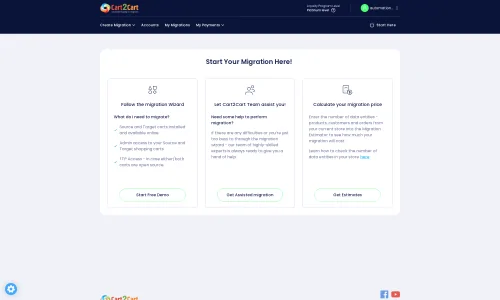
Step 1: Initiate Your Migration
Begin your migration journey by accessing the migration wizard. This intuitive interface will guide you through each stage of the data transfer. Click on the option to start a new migration.
Step 2: Set Up Source (Wundery via CSV) and Target (Shift4Shop) Stores
This critical step involves connecting both your current Wundery store (via CSV) and your new Shift4Shop platform.
- Configure Your Source Store (Wundery via CSV): From the list of available shopping carts, select "CSV File to Cart" as your source platform. You will then be prompted to upload the CSV files containing your Wundery store data. Ensure all relevant files (products, customers, orders, etc.) are uploaded for a complete data transfer. This method is designated as "Source only; CSV file import" as per the platform data.
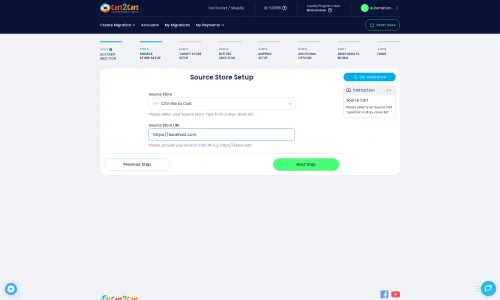
- Configure Your Target Store (Shift4Shop): Next, select "Shift4Shop" (or its equivalent in the list) as your target cart. You will need to provide your Shift4Shop store URL and any required access credentials, such as an API key or admin login details, to establish a secure connection.
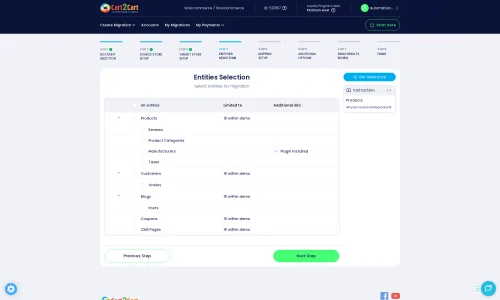
Step 3: Choose Entities for Data Transfer
Now, specify exactly which types of data you want to move from Wundery to Shift4Shop. You have the flexibility to select all entities or pick specific ones based on your needs. Key transferable entities include:
- Products (SKUs, variants, descriptions, images)
- Product Categories
- Product Manufacturers
- Product Reviews
- Customers
- Orders (with full order history)
- Invoices
- Taxes
- Coupons
- CMS Pages
- Blogs and Blog Posts
Step 4: Configure Data Mapping
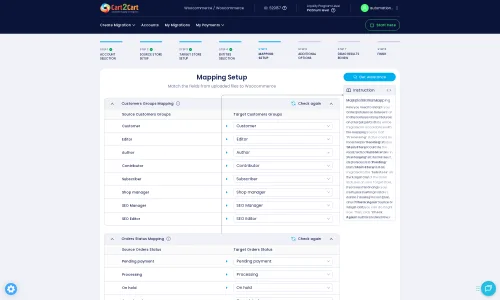
Data mapping ensures that your Wundery data fields correctly align with Shift4Shop's structure. This step is crucial for maintaining data consistency and integrity, especially for customer groups and order statuses. For instance, you will map your Wundery customer roles to Shift4Shop's equivalents (e.g., "Customer" to "Customer") and order statuses (e.g., "Pending" to "Pending Payment").
Step 5: Select Additional Migration Options
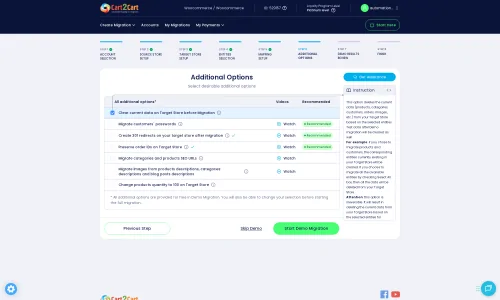
Enhance your migration with a range of additional options designed to optimize the transfer and safeguard your store's performance:
- Clear Target Store Data: The "Clear current data on Target store before migration option" allows you to remove any existing data in Shift4Shop before importing, ensuring a clean slate.
- Preserve IDs: Opt to "Preserve Category IDs," "Preserve Product IDs," "Preserve Customers IDs," and "Preserve Orders IDs" to maintain original identification numbers, which can be critical for integrations and internal records. Learn more about How Preserve IDs options can be used?.
- SEO URLs: Preserve your search engine optimization efforts by migrating SEO URLs. This helps maintain your link equity and existing SEO rankings.
- Migrate Images in Description: Ensure product images embedded within descriptions are transferred.
- Password Migration: Securely migrate customer passwords to ensure a seamless login experience for your existing customer base.
- Create 301 Redirects: Automatically create 301 redirects to guide users and search engines from old Wundery URLs to their new Shift4Shop counterparts, preventing broken links and preserving SEO.
Step 6: Run Demo Migration & Full Migration
Before committing to a full transfer, we highly recommend performing a demo migration. This free trial allows you to move a limited number of entities (e.g., 10 products, 10 customers, 10 orders) to Shift4Shop, enabling you to review the process, verify data integrity, and ensure everything is working as expected. This helps you catch and address any potential issues early.
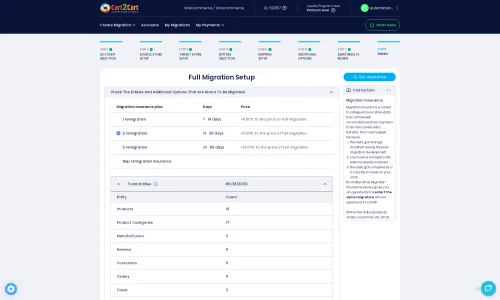
Once you are satisfied with the demo results, proceed with the full migration. This will transfer all selected data from your Wundery CSV files to your new Shift4Shop store. Consider adding a Migration Insurance Service, which offers additional remigrations for a set period, providing peace of mind. Find out How Migration Insurance works?.
Post-Migration Steps
After your data has successfully transitioned to Shift4Shop, several crucial post-migration tasks remain to ensure your new store is fully operational and optimized:
- Verify Data Integrity: Thoroughly check all migrated data in your Shift4Shop store. Confirm that product details, customer accounts, order histories, and other entities have transferred accurately and completely. Look for correct SKUs, variants, prices, images, and customer data.
- Configure Store Settings: Set up essential store configurations specific to Shift4Shop, including payment gateways, shipping methods, tax settings, and general store preferences.
- Test Functionality: Conduct extensive testing of your new Shift4Shop store. Place test orders, create customer accounts, verify search functionality, and ensure all features are working correctly. Check the user experience across different devices.
- Implement 301 Redirects: If not already handled by an additional option during migration, implement 301 redirects to redirect old Wundery URLs to their corresponding new Shift4Shop URLs. This is vital for preserving your SEO rankings and preventing broken links.
- Update DNS Settings: Once you are confident your Shift4Shop store is ready, update your domain's DNS settings to point to your new Shift4Shop store. Be prepared for a brief period of downtime during this propagation.
- Final Checks and Go-Live: Perform a final comprehensive review of your store. Once satisfied, officially launch your Shift4Shop store.
- Consider Recent Data Migration: If new orders or customer registrations occur on your Wundery store during the migration period, consider using a Recent Data Migration Service to transfer this fresh data, ensuring nothing is missed.
Ways to perform migration from Wundery to Shift4Shop
Automated migration
Just set up the migration and choose the entities to move – the service will do the rest.
Try It Free
Data Migration Service Package
Delegate the job to the highly-skilled migration experts and get the job done.
Choose Package

Benefits for Store Owners

Benefits for Ecommerce Agencies
Choose all the extra migration options and get 40% off their total Price

The design and store functionality transfer is impossible due to Wundery to Shift4Shop limitations. However, you can recreate it with the help of a 3rd-party developer.

Your data is safely locked with Cart2Cart
We built in many security measures so you can safely migrate from Wundery to Shift4Shop. Check out our Security Policy
Server Security
All migrations are performed on a secure dedicated Hetzner server with restricted physical access.Application Security
HTTPS protocol and 128-bit SSL encryption are used to protect the data being exchanged.Network Security
The most up-to-date network architecture schema, firewall and access restrictions protect our system from electronic attacks.Data Access Control
Employee access to customer migration data is restricted, logged and audited.Frequently Asked Questions
Should I use an automated tool or hire an expert for Wundery to Shift4Shop migration?
How can I prevent SEO loss when switching from Wundery to Shift4Shop?
Can customer passwords be migrated from Wundery to Shift4Shop?
Is my Wundery store data secure during the transfer to Shift4Shop?
How is data accuracy ensured after migrating from Wundery to Shift4Shop?
What data entities can be migrated from Wundery to Shift4Shop?
How do I transfer my store's design and theme from Wundery to Shift4Shop?
How long does a typical Wundery to Shift4Shop migration take?
What factors influence the cost of migrating from Wundery to Shift4Shop?
Will my Wundery store experience downtime during migration to Shift4Shop?
Why 150.000+ customers all over the globe have chosen Cart2Cart?
100% non-techie friendly
Cart2Cart is recommended by Shopify, WooCommerce, Wix, OpenCart, PrestaShop and other top ecommerce platforms.
Keep selling while migrating
The process of data transfer has no effect on the migrated store. At all.
24/7 live support
Get every bit of help right when you need it. Our live chat experts will eagerly guide you through the entire migration process.
Lightning fast migration
Just a few hours - and all your store data is moved to its new home.
Open to the customers’ needs
We’re ready to help import data from database dump, csv. file, a rare shopping cart etc.
Recommended by industry leaders
Cart2Cart is recommended by Shopify, WooCommerce, Wix, OpenCart, PrestaShop and other top ecommerce platforms.
Trusted by eCommerce dominators since 2009
















Great Solution! Excellent Support team which helped to migrate my store data from Magento to Bigcommerce in no time. Cart2Cart developed a custom solution to which helped me to Migrate my Blog Data too. I will surely use their service on my upcoming projects.
Review source

Migration from Shopify to BigCommerce was exactly what I need it. Customers information, orders, products description and images were displayed in my new platform perfectly. Additionally, the support team were very helpful and patience while I was doing all of this process. I highly recommend it!
Review source

Working with Cart2Cart on a recent Yahoo Store to BigCommerce Store migration was a pleasure. The support was very helpful in getting to my end solution. I would definitely recommend their service for anyone looking to migrate data between these platforms.
Review source

Solid work on the cart2cart migration from Magento to BigCommerce! Also, they helped me a lot for the data re-migration due to an accidental deletion on BigCommerce I definitely would recommend Cart2Cart 🙂
Review source

I have been very happy with the service and support of Cart2Cart in migrating from an older WebAsyst based e-commerce site to a much more modern CS-Cart based one. Worked perfectly!
Review source

Very good support. They migrated our store from Big Cartel to Magento, and were very cooperative during all this process. Thank you team. I recommend them to everyone
Review source
I have successfully used Cart2Cart to migrate products & categories from DrupalCommerce to Magento. It’s easy, affordable and they offer decent support (no I’m not affiliated with them).
Review source
we have already contracted the service three times to migrate from prestashop to magento. We were very well catered for. I recommend!
Review source
Many of my customers have Magento 1 stores. This year Magento will stop supporting this system and because of this these customers need to migrate to another system. Migration can be difficult and very time consuming process. But then i found Cart2Cart. There solution is the best and affordable. With the first migration there where some problems, but i did made some mistakes with filling in the correct fields to get a connection between the current and the target store. After starting a chat these problems where fixed very quickly. Support is very good and there solution is very affordable. The perfect solution!
Review source
We were in need of migrating 10.000 orders & customers from a PrestaShop site to a Magento site, already being in use. We therefore needed to be extra careful not to erase any of the existing data, which is why we seeked out the service of Cart2Cart. With a readily available customer service providing guidance and support during the entire process, we felt secure in the choice of Cart2Cart. We also enjoyed the possibility to do a test migration to be able to verify the values, before going ahead with a full migration. The full migration was surprisingly quick, within just a couple of minutes we had successfully transfered all the data, without experiencing any issues on the site. I’d recommend Cart2Cart to anyone who are looking to simplify the process of migrating.
Review source