
Big Cartel to Magento Migration - Step-by-Step Guide & Expert Services
Big Cartel to Magento migration simplified. Elevate your store's capabilities and move Big Cartel store to Magento effortlessly. Cart2Cart ensures a swift, secure, and seamless switch from Big Cartel to Magento, preserving your vital SEO rankings and guaranteeing zero downtime. Reliably transfer data, including products and customers, with expert precision. Whether you need a detailed step-by-step guide or prefer our specialists handle your Big Cartel to Magento migration completely, we’ve got you covered.
What data can be
migrated from Big Cartel to Magento (Adobe Commerce)
-
Products
-
Product Categories
-
Manufacturers
-
Customers
-
Orders
- Name, SKU, Full Description, Manufacturer.
- Price.
- Product Image, Additional Images.
- Options(Name, Price).
- Name.
- Name.
- First Name, Last Name, Email.
- Customer Shipping Address(First Name, Last Name, Address 1, Address 2, Country, State, City, Zip Code).
- ID, Order Date, Order Status, Order Products(Name, Option), Product Price, Quantity, SubTotal Price, Discount Price, Tax Price, Total Price, Order Comments.
- Customer Name, Email.
- Shipping Address(First Name, Last Name, Address 1, Address 2, Country, State, City, Zip Code).
- Name, SKU, Full Description, Manufacturer.
- Price.
- Product Image, Additional Images.
- Options(Name, Price).
- Name.
- Name.
- First Name, Last Name, Email.
- Customer Shipping Address(First Name, Last Name, Address 1, Address 2, Country, State, City, Zip Code).
- ID, Order Date, Order Status, Order Products(Name, Option), Product Price, Quantity, SubTotal Price, Discount Price, Tax Price, Total Price, Order Comments.
- Customer Name, Email.
- Shipping Address(First Name, Last Name, Address 1, Address 2, Country, State, City, Zip Code).
Products
Estimate your Migration Cost
Thanks to Cart2Cart`s flexible pricing policy, the migration price depends on the volume of transferred entities and the additional migration options you select. Simply choose your Source and Target platforms and get the approximate price of your Big Cartel to Magento store conversion right after completing the free Demo.
How to Migrate from Big Cartel to Magento In 3 Steps?
Connect your Source & Target carts
Choose Big Cartel and Magento from the drop-down lists & provide the stores’ URLs in the corresponding fields.
Select the data to migrate & extra options
Choose the data you want to migrate to Magento and extra options to customise your Big Cartel to Magento migration.
Launch your Demo/Full migration
Run a free Demo to see how the Cart2Cart service works, and when happy - launch Full migration.
Migrate Big Cartel to Magento: A Detailed Step-by-Step Guide for Merchants
Seamlessly Migrate from Big Cartel to Magento: Your Expert How-To Guide
Are you outgrowing the simplicity of Big Cartel and ready to transition to a more robust, scalable platform like Magento? Moving your e-commerce store is a significant undertaking, but with the right strategy and tools, it can be a smooth and rewarding process. Magento offers unparalleled flexibility, extensive features, and scalability that can empower your business to reach new heights. This comprehensive guide will walk you through every essential step of migrating your Big Cartel store data to Magento, ensuring a successful replatforming with minimal downtime and maximum data integrity.
We'll cover everything from initial preparation to post-migration checks, leveraging best practices for data transfer. Get ready to unlock Magento's powerful capabilities for your online store.
Prerequisites for Migration
Before you embark on your migration journey, proper preparation is key. Ensuring both your source (Big Cartel) and target (Magento) environments are ready will prevent common roadblocks and streamline the data transfer process.
- Big Cartel Store Preparation:
While Big Cartel offers a user-friendly experience, its direct API support for comprehensive data transfer can be limited. Therefore, you will typically need to manually export your data. Ensure your data is clean and organized. It's highly recommended to export your products, orders, customers, and any other relevant information into CSV files. This will be the primary method for moving your data. - Magento Store Setup:
Your Magento store must be fully installed and configured on your chosen hosting. This includes setting up your Magento admin panel, ensuring you have FTP/SFTP access to your server’s root directory, and confirming your hosting environment meets Magento's system requirements. No need to populate it with products, as the migration will handle that. - Access Credentials:
You will need administrative access to both your Big Cartel account (for data export) and your Magento admin panel (for connection). For Magento, you’ll also need FTP/SFTP access to upload the connection bridge. For more details on necessary credentials, refer to The Short & Essential Guide to Access Credentials for Cart2Cart. - Backup Your Data:
Always create a full backup of your Big Cartel store data, including all exported CSVs. Although you're migrating to an empty Magento instance, it's also wise to back up your fresh Magento installation. - Familiarize with Magento:
Spend some time understanding Magento's architecture, product types, customer groups, and order statuses. This will be crucial during the data mapping phase. - Review Magento Plugin Requirements:
For specific functionalities like password migration, Magento requires a dedicated module. Additionally, a reviews table check might be necessary to ensure all product reviews transfer correctly.
Performing the Migration: A Step-by-Step Guide
Executing the migration involves a series of steps, typically facilitated by a specialized migration tool to ensure accuracy and efficiency. Here’s how to perform the data transfer:
Step 1: Export Data from Big Cartel as CSV Files
Given Big Cartel's architecture, direct API migration for all data entities isn't always fully supported by third-party tools. The most reliable method to extract your store's valuable information is to export it into CSV files. Navigate to your Big Cartel admin panel and locate options to export your products, orders, and customer data. Save these files securely, as they will serve as your source data for the migration tool.
For complex data structures or specific customization needs, consider professional CSV File Data Migration services.
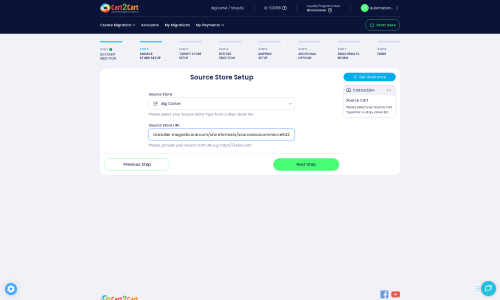
Step 2: Source Store Setup
The first major step in your migration tool's wizard is to specify your current e-commerce platform. Select Big Cartel from the list of available source carts. Although you're selecting Big Cartel, the underlying data transfer method will primarily involve using your previously exported CSV files. This 'CSV-to-Cart' approach ensures comprehensive data extraction where direct API access might be restricted.
You will be prompted to upload your Big Cartel CSV files to the migration tool, which will then process them as the source data.
Step 3: Target Store Setup
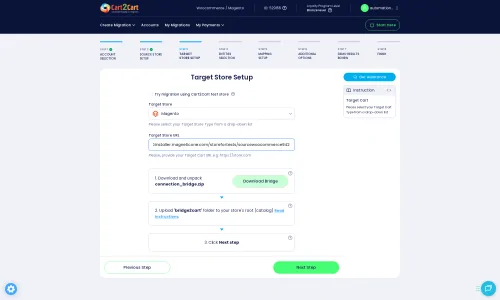
Next, configure your target store. Select Magento as your target platform. Provide your Magento store's URL. To establish a secure connection, you will need to download a 'Connection Bridge' file from the migration tool. Unzip this file and upload the resulting 'bridge2cart' folder to the root directory of your Magento installation via FTP/SFTP. This bridge acts as a secure gateway, allowing the migration tool to access and transfer data to your new Magento store.
Step 4: Select Data Entities for Migration
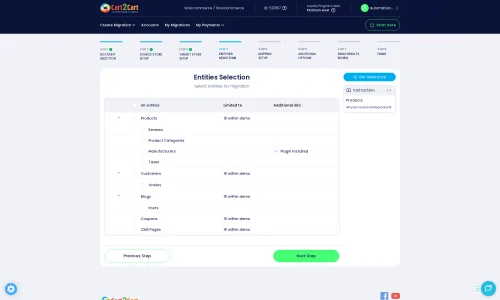
This critical step allows you to choose exactly which types of data you want to transfer from Big Cartel to Magento. You can select individual entities or opt to migrate all of them. The supported entities for migration to Magento typically include:
- Products (including SKUs, variants, descriptions, images)
- Product Categories
- Product Manufacturers
- Product Reviews (subject to Magento's reviews table dependency and checks)
- Customers (including customer data, addresses)
- Orders (including order statuses, history)
- Invoices
- Taxes
- Stores
- Coupons
- CMS Pages
Carefully review your selection to ensure all vital business information is included.
Step 5: Configure Additional Options & Data Mapping
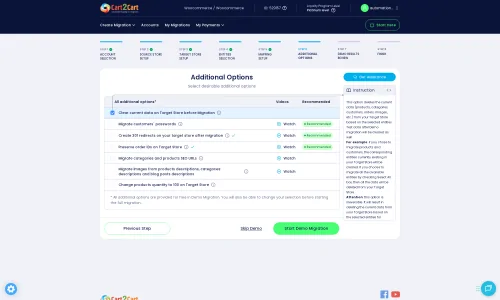
This stage offers powerful tools to customize your migration and ensure data integrity. Review the available 'Additional Options' to tailor the migration to your specific needs:
- Clear Target Store Data: Decide if you want to clear any existing data on your Magento store before migration. This is often recommended for fresh installations.
- Preserve IDs: Options like Preserve Product IDs, Customer IDs, and Order IDs are crucial for maintaining consistency and avoiding issues with external systems.
- Create 301 SEO URLs: This is vital for maintaining your SEO rankings and link equity. The tool will automatically create redirects from your old Big Cartel URLs to the new Magento URLs.
- Password Migration: If you wish to migrate customer passwords, ensure you have the necessary Magento module installed, as this is a specific requirement for Magento migrations.
- Migrate Images in Description: Ensure product images embedded in descriptions are transferred.
- Create Variants from Attributes: Important for migrating complex product options.
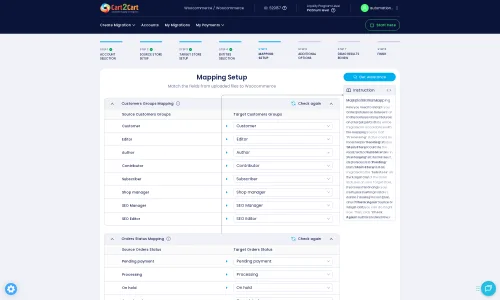
Following additional options, you'll engage in Data Mapping. This step involves matching fields from your Big Cartel data (via CSV) to their corresponding fields in Magento. Pay close attention to mapping customer groups, order statuses, and product attributes to ensure data consistency and a smooth user experience on your new platform.
Step 6: Run a Demo Migration (Recommended)
Before committing to the full migration, perform a demo migration. This transfers a limited number of entities (e.g., 10-20 products, customers, and orders) to your Magento store. The demo migration allows you to:
- Test the connection between your Big Cartel data and Magento.
- Verify data mapping and ensure all information appears correctly.
- Identify and resolve any potential issues before the full transfer.
This is a valuable Migration Preview Service that helps build confidence in the process.
Step 7: Perform Full Migration
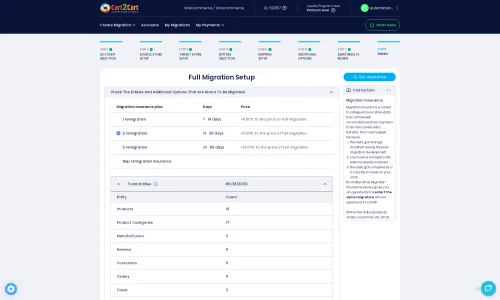
Once you’re satisfied with the demo results, you can proceed with the full data transfer. At this stage, you might also consider selecting a Migration Insurance Plan, which offers options for remigrations if you discover any issues post-transfer or wish to sync recent data.
Initiate the full migration and monitor its progress. Depending on the volume of your data, this process can take from minutes to several hours. The migration tool will keep you updated on the status.
Post-Migration Steps
Completing the data transfer is a major milestone, but your work isn't done yet. A few crucial post-migration steps will ensure your new Magento store is fully functional and optimized:
- Reindex Magento Data: After the migration, it is highly recommended to reindex all your Magento data. This is crucial for your store's performance, search functionality, and correct display of products and categories.
- Thoroughly Test Your Magento Store: Conduct extensive testing of all functionalities. Check product pages, add items to the cart, complete the checkout process, verify customer accounts, and test search capabilities. Ensure all images, descriptions, and metadata have transferred correctly.
- Configure Payment & Shipping Gateways: Set up your preferred payment methods (e.g., PayPal, Stripe) and shipping carriers within your Magento admin.
- Install Essential Extensions and Themes: Explore the Magento App Store for extensions that enhance your store's functionality or improve the user experience. Install your chosen theme and customize it to match your brand.
- Update DNS Settings: Once you are confident your Magento store is fully operational, update your domain's DNS settings to point to your new Magento hosting. Plan this carefully to minimize downtime.
- Review and Update SEO: Verify that all 301 redirects are working correctly to preserve your SEO rankings and link equity. Update your Google Search Console and analytics to reflect the new store.
- Consider Recent Data Migration: If new orders or customer registrations occurred on your Big Cartel store during the migration period, consider using a remigration or recent data migration service to sync any last-minute data.
- Deactivate Your Big Cartel Store: Once your Magento store is live and fully tested, you can safely deactivate your old Big Cartel store.
By following these steps, you can confidently transition your e-commerce business from Big Cartel to Magento, laying the groundwork for future growth and success. If you encounter any challenges or require expert assistance, don't hesitate to contact our support team for specialized services.
Ways to perform migration from Big Cartel to Magento
Automated migration
Just set up the migration and choose the entities to move – the service will do the rest.
Try It Free
Data Migration Service Package
Delegate the job to the highly-skilled migration experts and get the job done.
Choose Package
Custom Migration
Need metafields, SEO URLs, variant rules, or other tailored mapping? Explore customizations built for real merchant demand.
Browse Customizations

Benefits for Store Owners

Benefits for Ecommerce Agencies
Choose all the extra migration options and get 40% off their total Price

The design and store functionality transfer is impossible due to Big Cartel to Magento limitations. However, you can recreate it with the help of a 3rd-party developer.

Your data is safely locked with Cart2Cart
We built in many security measures so you can safely migrate from Big Cartel to Magento. Check out our Security Policy
Server Security
All migrations are performed on a secure dedicated Hetzner server with restricted physical access.Application Security
HTTPS protocol and 128-bit SSL encryption are used to protect the data being exchanged.Network Security
The most up-to-date network architecture schema, firewall and access restrictions protect our system from electronic attacks.Data Access Control
Employee access to customer migration data is restricted, logged and audited.Frequently Asked Questions
How do I validate data accuracy after migrating from Big Cartel to Magento?
Should I choose an automated tool or a professional for Big Cartel to Magento migration?
Will my Big Cartel store experience downtime during migration to Magento?
What factors determine the cost of a Big Cartel to Magento migration?
Can customer passwords be successfully migrated from Big Cartel to Magento?
Will my Big Cartel store's design and theme transfer directly to Magento?
How to prevent SEO ranking loss when migrating from Big Cartel to Magento?
Is my e-commerce data secure during the Big Cartel to Magento migration process?
What is the estimated timeline for a Big Cartel to Magento data migration?
What data entities are transferred during a Big Cartel to Magento migration?
Why 150.000+ customers all over the globe have chosen Cart2Cart?
100% non-techie friendly
Cart2Cart is recommended by Shopify, WooCommerce, Wix, OpenCart, PrestaShop and other top ecommerce platforms.
Keep selling while migrating
The process of data transfer has no effect on the migrated store. At all.
24/7 live support
Get every bit of help right when you need it. Our live chat experts will eagerly guide you through the entire migration process.
Lightning fast migration
Just a few hours - and all your store data is moved to its new home.
Open to the customers’ needs
We’re ready to help import data from database dump, csv. file, a rare shopping cart etc.
Recommended by industry leaders
Cart2Cart is recommended by Shopify, WooCommerce, Wix, OpenCart, PrestaShop and other top ecommerce platforms.
Trusted by eCommerce dominators since 2009
















Very good support. They migrated our store from Big Cartel to Magento, and were very cooperative during all this process. Thank you team. I recommend them to everyone
Review source

I have successfully used Cart2Cart to migrate products & categories from DrupalCommerce to Magento. It’s easy, affordable and they offer decent support (no I’m not affiliated with them).
Review source

we have already contracted the service three times to migrate from prestashop to magento. We were very well catered for. I recommend!
Review source

Many of my customers have Magento 1 stores. This year Magento will stop supporting this system and because of this these customers need to migrate to another system. Migration can be difficult and very time consuming process. But then i found Cart2Cart. There solution is the best and affordable. With the first migration there where some problems, but i did made some mistakes with filling in the correct fields to get a connection between the current and the target store. After starting a chat these problems where fixed very quickly. Support is very good and there solution is very affordable. The perfect solution!
Review source

We were in need of migrating 10.000 orders & customers from a PrestaShop site to a Magento site, already being in use. We therefore needed to be extra careful not to erase any of the existing data, which is why we seeked out the service of Cart2Cart. With a readily available customer service providing guidance and support during the entire process, we felt secure in the choice of Cart2Cart. We also enjoyed the possibility to do a test migration to be able to verify the values, before going ahead with a full migration. The full migration was surprisingly quick, within just a couple of minutes we had successfully transfered all the data, without experiencing any issues on the site. I’d recommend Cart2Cart to anyone who are looking to simplify the process of migrating.
Review source

Great product, great service. I have done successfully migration from WooCommerce to Magento 2. Using Cart2Cart migration tools I've Migrated 2163 Customers and 2297 Orders in just a few minutes.Very good support team. I highly recommend them to anyone needing to migrate their website. Thank you Cart2Cart!
Review source
I used this service for migrating my Magento 1 shop to Magento 2 and this was working great. The customer service is very nice and are helping great when any questions. Thanks you guys!
Review source
Everything went perfect with my Magento 1 to Magento 2 migration. Any issues I had with migration were immediately resolved and there was always someone from the support team available to answer my questions. Will definitely be using this company again to handle any migrations I have in the future.
Review source
Really good services, I transfer my magento 1.9 data to magento 2 and everything goes well with the migration. I will recommend cart2cart to those who want to migrate their data. Once again thank you for your services.
Review source
We used Cart2cart several times for migration from Magento 1 to Magento 2. This always works great. If there are any problems there will also be a very good helpdesk that will help you with problems if there are.
Review source