Whether you are migrating to OpenCart for the first time or trying to fill in your existing store with actual data, OpenCart import products via CSV import is a great way to do that in bulk. Read on to discover how to transfer products from your current eCommerce solution to OpenCart with the help of the comma-separated value (CSV) file.
What is CSV and how to deal with it?
CSV is a comma-separated values file that allows data to be saved in a structured format. For specific guidance on CSV migration services, visit our dedicated page. Traditionally CSV is plain text that can contain numbers and letters only. Companies often use CSV to exchange data between different applications or software, especially if there is a huge amount of it.
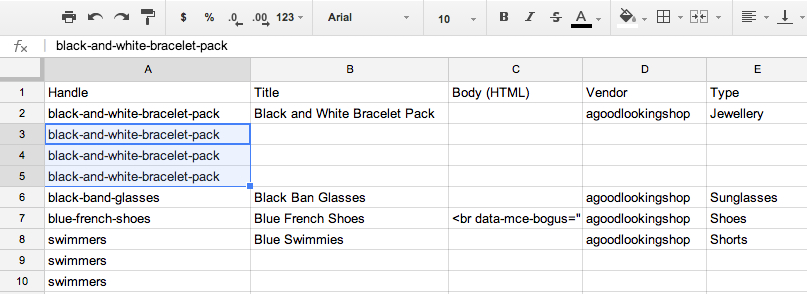
Being a common procedure, data import from CSV files to a shopping cart still puzzles many merchants. Even instructed by endless web tutorials, both textual and video ones, store owners often mess up data placement during imports, lose info, or contradictory, create unnecessary copies of it, a risk that Migration Insurance can mitigate.
Import products to OpenCart via CSV
By default, OpenCart doesn't provide the facility to import products from any external source. Therefore, there are two ways to import products to OpenCart:
- manually import a CSV file with your products to OpenCart using 3rd party modules, which may involve understanding custom attribute migration,
- automatically import products from CSV to OpenCart with the help of a SaaS tool.
There are few plugins on the official OpenCart extension marketplace, e.g. OpenCart Product Import.Though these add ons facilitate importing products to OpenCart, they require some technical skills from you and some time input. You can always appeal to developers - but remember that will cost you a thing.
Alternatively, the easiest and safest way to perform import products to OpenCart via CSV is to make use of automated solutions (like Cart2Cart). For comprehensive support, consider our Ultimate Data Migration Service. To those looking to save time and transfer data without getting into technicalities - this service is an optimal go-to.
How to import products to OpenCart? An automated solution
Considering the increasing tendency to automate any possible business process, it becomes clear why online retailers so much favor the automated approach. Cart2Cart allows store owners to automatically import products to OpenCart with just a few mouse clicks. This is part of our commitment to provide all-in-one solutions for data migration. For a deeper dive into these strategies, consult our in-depth guide on OpenCart migration. What is essential is that there are no coding skills required to take full advantage of the tool. You can check the quality of data transfer by performing a free Demo import of the products to your live OpenCart store. If satisfied with what you get, you can proceed with Full products import to OpenCart.
Get prepared
First off, make sure you’re prepared - download our template CSV file that’s structured accordingly to OpenCart requirements, such as those detailed in our OpenCart Migration Checklist, and adjust your current products file appropriately. For comprehensive advice, see our pre-migration tips.
Import CSV file automatically
Specify your Source & Target carts
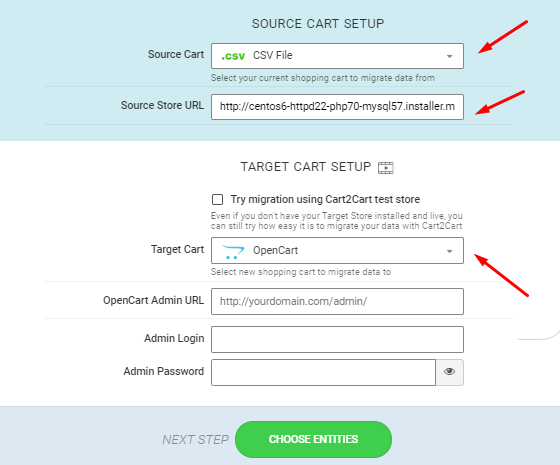
- If migrating from a CSV file: select CSV file as your Source Cart. Optionally, you can enter the URL of the store your CSV was exported from.
- If you’re migrating directly from a shopping cart: choose OpenCart as Target Cart, paste its admin URL and specify the admin login and admin password.
Choose what to migrate
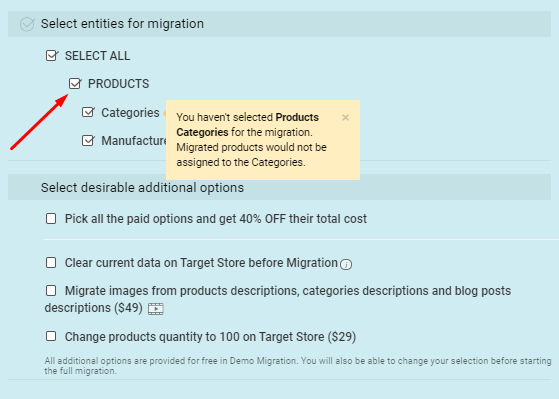
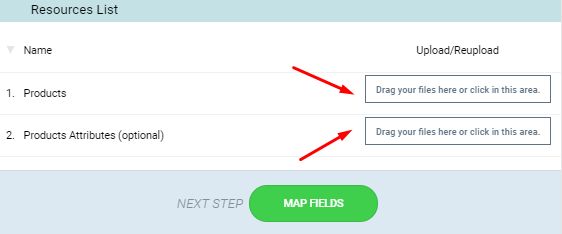
Just click on the Products checkbox to initiate OpenCart products import only. Upload your products CSV and the file with product images if you want to migrate them as well. If you don't - proceed to the next step.
Perform Smart Mapping
Map the fields in your CSV file with the corresponding ones on OpenCart. For complex scenarios, consider our Migration Customization Service.
Start Free Demo
Demo data migration is a free procedure that gives you an idea of how our service functions, allows you to move a limited number of entities to OpenCart live store, and is completed quickly. Thus, you'll be able to check if your CSV is structured correctly. This procedure is optional.
Perform full-scale Opencart csv product import
Finally, if you’re satisfied with the outcome of Demo import to OpenCart, and have thoroughly checked the demo results, double-check the entities you’ve picked and click the “Start Full Migration” button. Import products to Opencart will start right away. After the procedure is over, you'll get an email notification with the results. You can also review our guide on how to check full migration results to ensure everything is perfect.
Thinking of importing your products from CSV to OpenCart?
Turn to the Cart2Cart and get the job done in a totally automated way!
Migrate nowPost-Import Do’s
If all the instructions were followed strictly - mistakes surely won't happen. However, if you did miss something and now see some issues - here's what to do:
- If you see that some product images are missing - check your mapping once again, ensure that all the image fields are valid and full URLs are placed properly.
- If SKUs are not defined and paths aren’t valid - your CSV probably contains some inappropriate characters. Open your products file and look through the description thoroughly.
- If some data got duplicated - there likely was an SKU mismatch. Ensure all your SKU fields are mapped correctly.
Wrapping Up
That’s it - you’re completely ready to import products from CSV to OpenCart without any hassle. Don’t wait any longer, see how your store looks like on OpenCart right now via FREE Demo Migration.
Monthly Update – March 2026
As we step into March 2026, the landscape of eCommerce data management continues to evolve rapidly, particularly concerning product imports. A key trend to watch is the increasing integration of AI and machine learning in optimizing product data. This means that precise, well-structured CSV data isn't just about a smooth import; it's foundational for future AI-driven merchandising, personalized recommendations, and efficient inventory management. When preparing your OpenCart product CSVs this month, consider not only immediate compatibility but also long-term data utility. Ensure all fields, from descriptions and attributes to pricing and stock levels, are meticulously accurate and consistently formatted. The cleaner and more comprehensive your data, the better it will perform when integrated with advanced analytics and AI tools that are becoming standard in competitive online retail. Prioritize enriching your product data with high-quality images and detailed specifications, as these elements significantly enhance customer experience and conversion rates. Proactively addressing data quality issues now will pay dividends in leveraging future eCommerce innovations.
For more details, explore our FAQ section or schedule a call with a migration expert.