
If you are currently running an online shop powered by Squarespace but see those other eCommerce solutions sound better than yours - switch to another one. Among dozens of shopping carts that are floating around the Web market - Shopify might be the first option to evaluate. Let’s try to focus on those features that hold Squarespace back and make millions of users all over the globe gravitate towards Shopify.
Why Choose Shopify Over Squarespace?
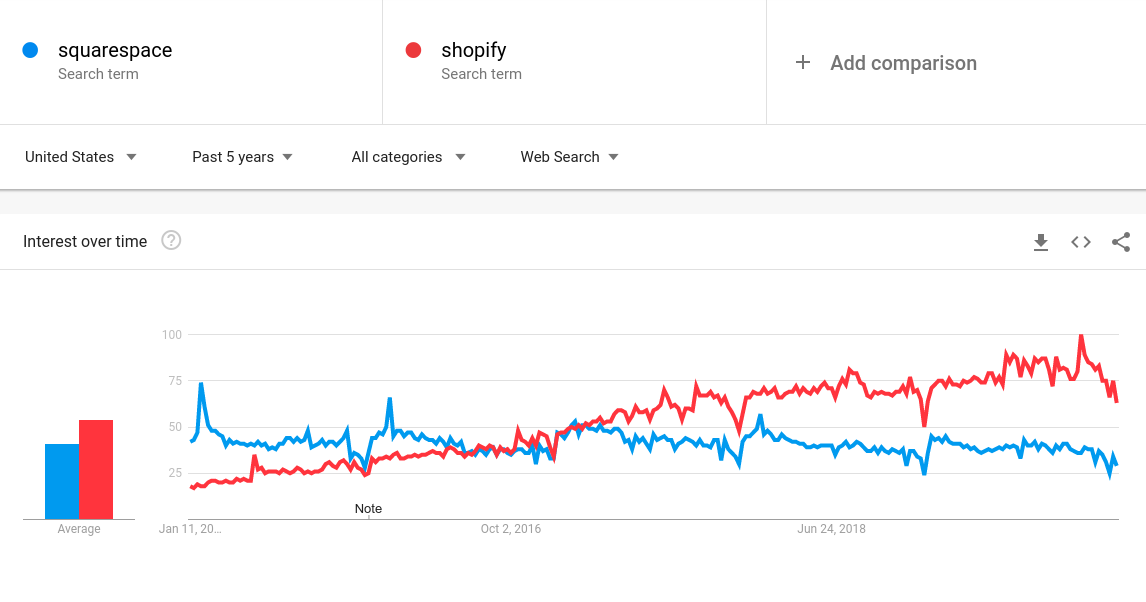
Despite all the advantages associated with Squarespace (best-designed templates, brilliant blogging features, ideal for creative industries, lower entry price plan), it is still behind Shopify in all market share segments. Google Trends consistently shows Shopify leading in popularity, reflecting its broader market adoption:
In short, Squarespace is a powerful and feature-rich website builder targeted at creatives (photographers, artists, designers) aiming to showcase their portfolio, no matter their technical expertise. But when it comes to settling an online store on - it’s definitely not the choice of merchants. The main points of criticism for Squarespace are:
- suited to smaller stores selling a few products;
- the lack of advanced eCommerce features and marketing tools;
- limited payment options;
- non-intuitive user interface;
- insufficient SEO capabilities.
Those entrepreneurs willing to create a good-looking, powerful online store with professional analytics often consider Shopify as the way to go. And not for nothing. The platform enjoys the fame of being one-fits-all-solution catering to the needs of both - average users and experienced developers. It is used worldwide for powering gorgeous do-it-yourself online stores of any complexity. The key advantages of Shopify that make users gravitate towards it are:
- professionally-looking themes and templates initially created for selling;
- diverse customer support available through several channels;
- the extensive set of features allowing to create a fully-featured online store;
- various flexible pricing plans depending on the specific store size;
- brilliant SEO score;
- extensive customer support and numerous self-help documentation.
With all that being said, both Squarespace and Shopify make it possible to create an online store that looks good and works well. Choosing between them really depends on what type of online shop you want to run and how much time and effort you’re going to put into it.
How to Migrate from Squarespace to Shopify?
If you’ve made the decision to move your current Squarespace store to Shopify - we would like to meet you halfway and take through the easiest and trouble-free way of conversion across platforms.
Prepare your Squarespace store
Take time to find the access details of your current Squarespace store (the URL, admin email and admin password). Besides, it is recommended to back up all the info of your current Squarespace to avoid any migration-associated risks.
Get your new Shopify store ready
Install your Shopify store without any additional modules and make it live. When done, choose the default Shopify theme and make no customizations until the migration is finalized (since it can negatively influence the process of migration).
With the help of the Migration Estimator feature, you can calculate the exact price of your Squarespace to Shopify migration.
Migrate Squarespace Store Data to Shopify
Install Your Source & Target Stores
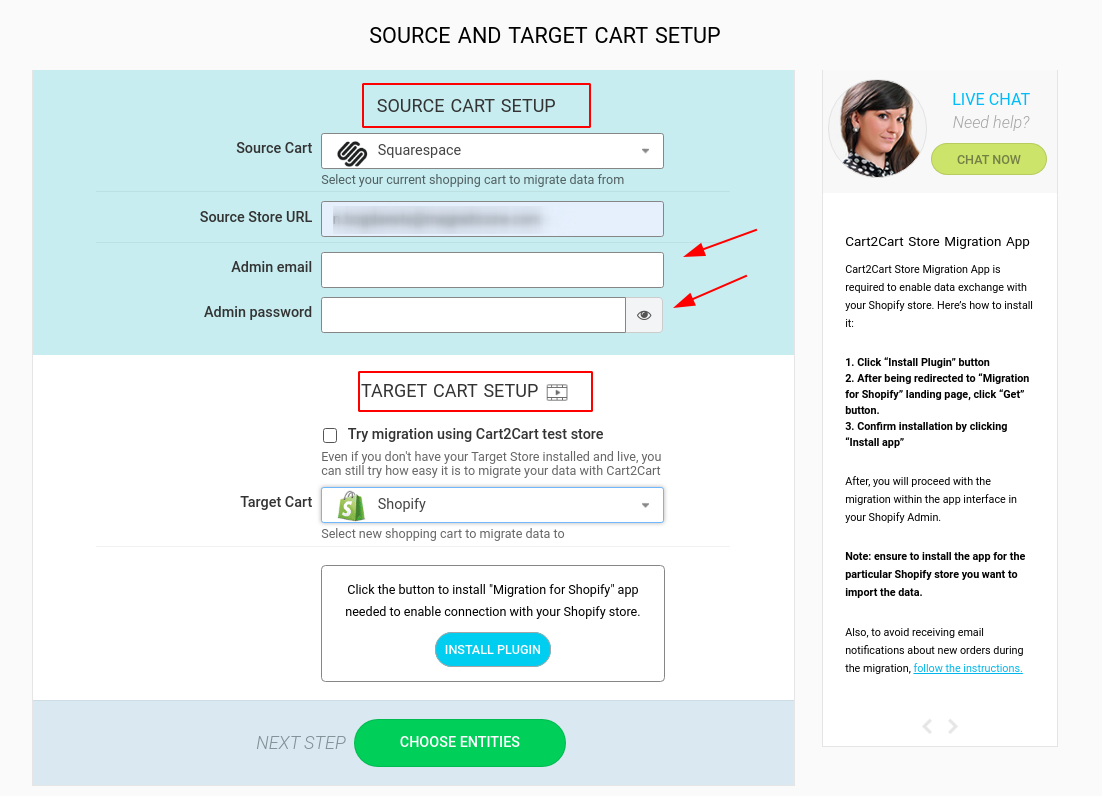
Set up your Squarespace and Shopify platforms by providing their access details (the URL, the admin email and password for Squarespace and only the URL for Shopify) in the appropriate fields of the migration wizard. When ready, click Choose Entities button.
Select Entities and Additional Migration Options for Transfer
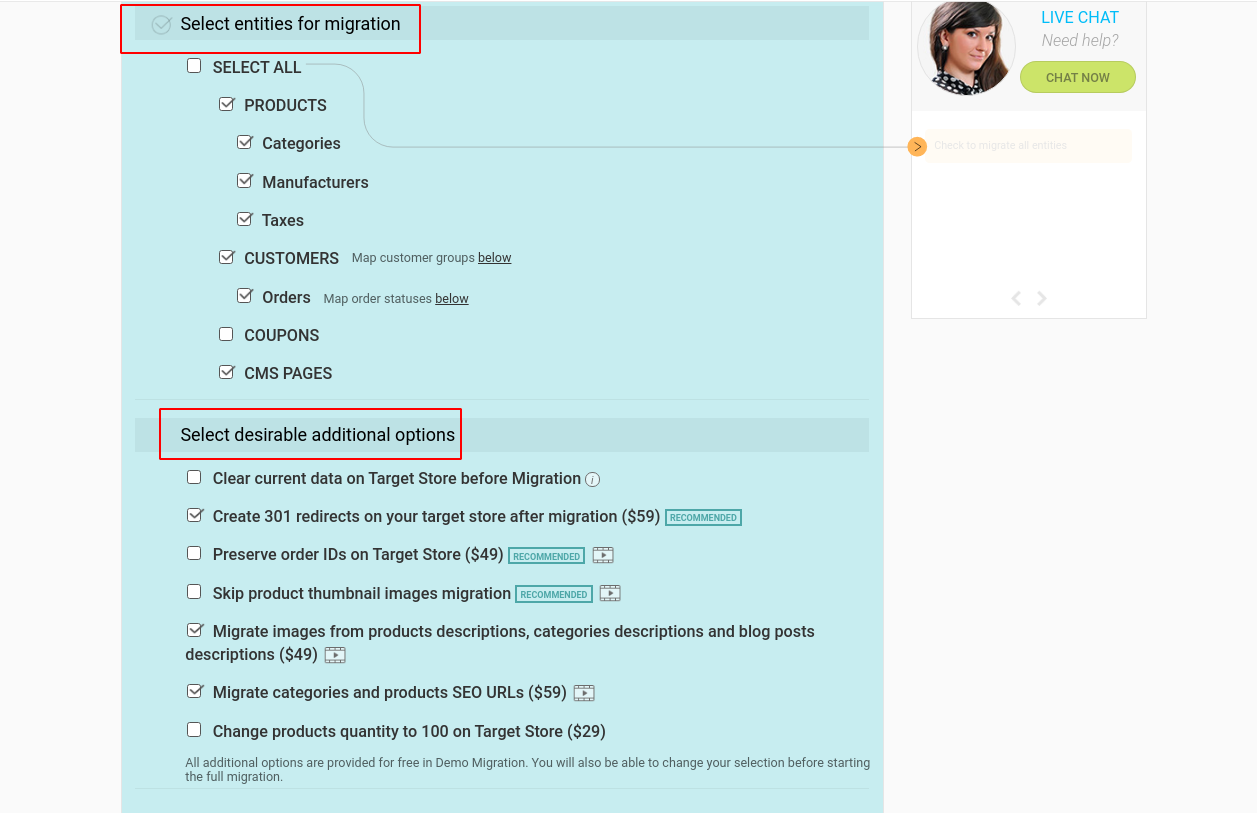
From the provided options choose the store data types you want to transfer from Squarespace to Shopify (products, product categories, customers, orders, coupons, blogs, blog posts, CMS pages). Once done, specify the additional migration opportunities aiming to make your replatforming even more seamless. To be more specific, you can take advantage of the following additional options:
- “Migrate Source Store categories into Shopify Automated Collections” option makes it possible to define a single product as belonging to several collections and organize your store better.
- “Create 301 redirects on your target store after migration” allows to keep old products and category URLs working at Shopify.
- “Migrate categories and products SEO URLs” aims to help you preserve all the current links structure to your products thus saving your old customers and SEO ranking of your store.
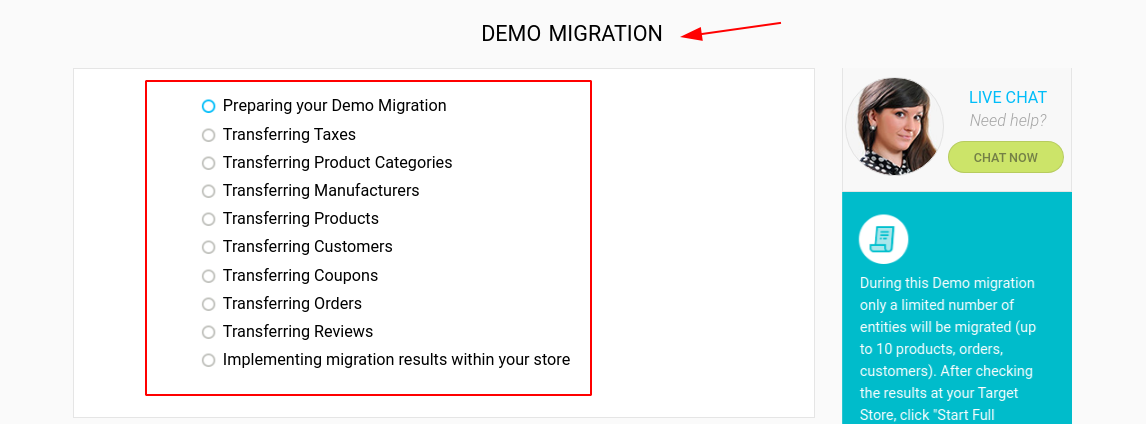
Run Free Demo Migration
Demo migration allows transferring a limited number of store entities in 10-30 min for you to see the service functionality in progress. Don’t close the browser window until the demo migration is finished.
Launch Full Migration
Finally, if you are satisfied with the Demo result- initiate Full Migration. Once you’ve activated the matching button - your Squarespace data will be transferred to Shopify accurately and precisely.
Note: eCommerce data migration will take approximately a few hours (depending on the size of the transferrable data), it will not affect your current Squarespace store performance in no way. Customers will be able to make purchases during the whole process of data transfer to Shopify.
Post-Migration Activities
Once you have all your Squarespace data transferred to Shopify, there are some must-do tips you have to do to ensure your new Shopify store functions properly. To be more specific, check the new store for possible issues by performing a post-migration audit. Besides, take the time to install all the necessary apps to expand the functionality of the new store as required. Don’t forget to notify your clients about the replatforming and ask them to reactivate their accounts. If you’re also planning to import products from Shopify to WooCommerce, make sure to complete this step carefully to ensure the product data is accurate across platforms.
Ready to take your online business a level up with Shopify? Start Free Demo migration from Squarespace to Shopify and see how easy it is to perform an eCommerce replatforming without going deep into codes and scripts. If you’re considering moving from WooCommerce to Shopify, check out professional WooCommerce to Shopify migration services to simplify the transition and ensure everything runs smoothly.
Monthly Update – March 2026
As we move into March 2026, it's an opportune moment for e-commerce store owners, especially those who have recently undergone a platform migration, to conduct a thorough performance review of Q1. Focus on analyzing your sales data, customer acquisition costs, and conversion rates on your new Shopify store. Leverage analytics tools to identify popular products, peak shopping times, and customer behavior patterns. This data is crucial for optimizing your marketing strategies and inventory management for the upcoming quarters. Furthermore, prioritize continuous SEO monitoring post-migration. Even with careful planning, search engine rankings can fluctuate. Regularly check your keyword performance, backlink profile, and ensure all 301 redirects are functioning correctly to preserve your organic traffic. Consider implementing advanced personalization features, such as AI-driven product recommendations, to enhance user experience and drive sales. March is also an excellent time to streamline your checkout process, as a smooth transaction journey significantly impacts conversion. Staying agile and data-driven is key to sustained success in the dynamic e-commerce landscape.
For more details, explore our FAQ section or schedule a call with a migration expert.



