General Questions

There’s an issue when I’m trying to log in to the Wix admin. What should I do?

Troubleshooting Wix Admin Login Issues During Data Migration

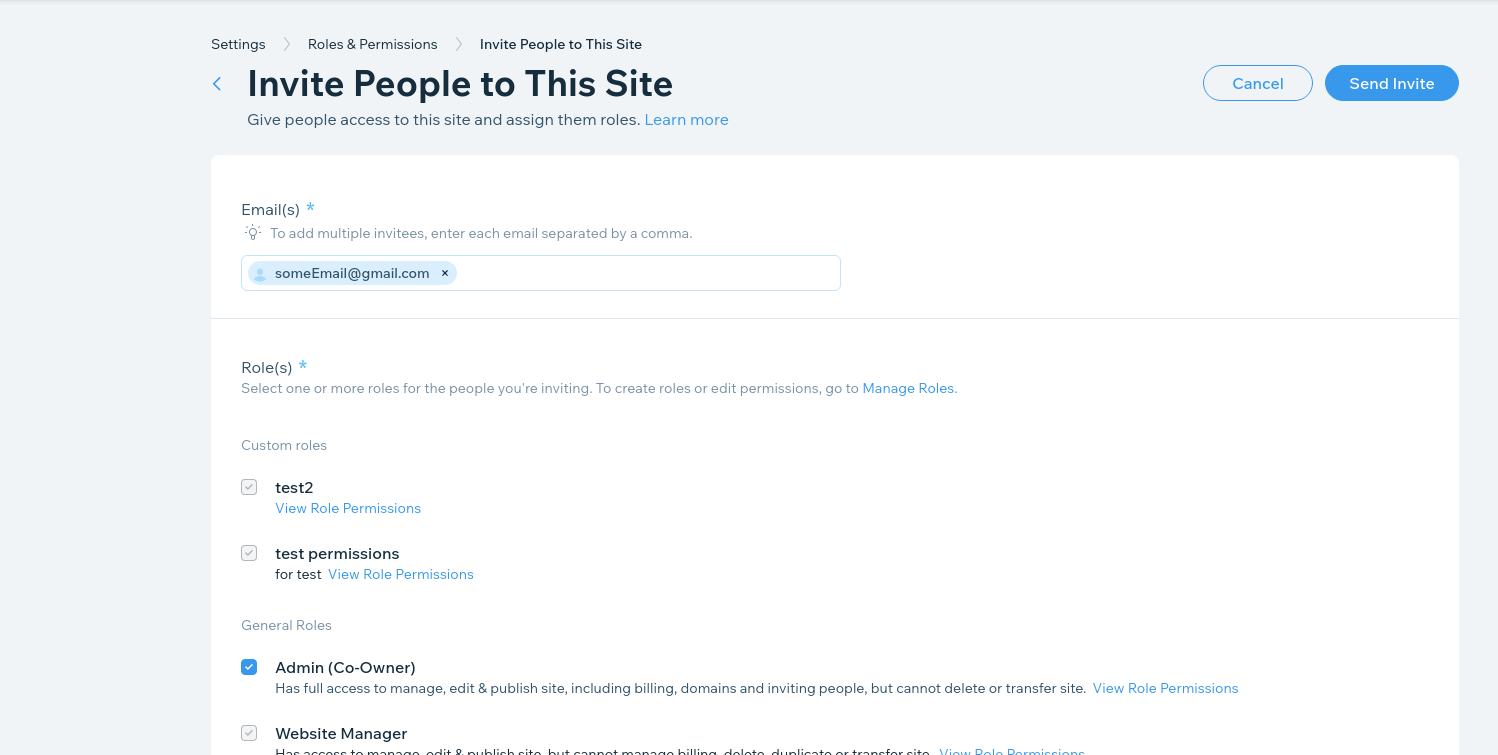
When performing a data migration to or from Wix, accessing the Wix admin panel is crucial. However, users sometimes encounter issues logging in. This is usually related to the user role assigned within Wix.

Clients accessing the Wix admin should ensure they have either the Owner or Co-Owner role. These roles provide the necessary permissions to manage all aspects of the site, which is essential for Cart2Cart to perform the data migration successfully.

Wix admin access: user roles for data migration

To check or change your user role in Wix:

  1. Log in to your Wix account.
  2. Go to your site's dashboard.
  3. Navigate to Settings, then Roles & Permissions.
  4. Here, you can see your current role and, if you are the Owner, you can invite or change the roles of other users.

If you do not have the Owner or Co-Owner role, contact the site owner and request the necessary permissions. Without these permissions, Cart2Cart may not be able to properly access and migrate your store's data.

Need to migrate your store to or from Wix? Start your free demo now!


Do you need help? Contact our support team

Just set up the migration and choose the entities to move – the service will do the rest.

Try It Free

Delegate the job to the highly-skilled migration experts and get the job done.

Choose Package